IRS Deadline: February 1, 2027

Yes — file a corrected Form 1099 whenever information already submitted to the IRS or furnished to a payee is wrong. Start by doing three things: (1) identify the error type (Type 1 or Type 2), (2) confirm whether the original return was e-filed or paper-filed, and (3) launch the correct correction workflow. The IRS Instructions for Forms 1099-MISC and 1099-NEC and Publication 1099 govern the full process, while IRC sections 6721 and 6722 set the penalty framework for incorrect filings and incorrect payee statements respectively.
- Step 1 — Identify the error type. Type 1 errors (wrong dollar amount, wrong code, blank fields) require one corrected return. Type 2 errors (wrong TIN, wrong recipient, wrong form type) require two returns.
- Step 2 — Confirm the original filing method. If the original was e-filed, the correction must also be e-filed. Switching to paper is not accepted unless you hold an approved waiver.
- Step 3 — Start the right workflow. For Type 1, check the CORRECTED box and submit with the corrected data. For Type 2, file a zeroed-out return first, then a second return with the correct information.
Key Takeaways
Filing a corrected 1099 requires identifying the error type first: Type 1 errors need one corrected return; Type 2 errors require two returns, and the CORRECTED checkbox — never the VOID box — is the only valid correction mechanism for filed returns.
| Point | Details |
|---|---|
| Classify the error first | Type 1 (amount/code) needs one return; Type 2 (wrong TIN/recipient/form) needs two returns. |
| E-file requirement carries forward | If the original was e-filed, the correction must also be e-filed; paper is not accepted without an approved waiver. |
| Two penalties, one error | IRC 6721 and 6722 assess separate penalties for the IRS filing and the payee statement — correct both promptly. |
| Furnish corrected statements immediately | Send the corrected Copy B to the recipient the same day as IRS submission to close the notification gap. |
| TaxFormHero for corrections | IRS-authorized e-file with bulk import, CORRECTED checkbox support, TIN matching, and timestamped acknowledgements starting at $1.99 per form. |
TaxFormHero is an IRS-authorized e-filing platform, so you can e-file Form 1099-NEC online without paper or a subscription.
When do you need to file a corrected 1099 versus an original?
A corrected 1099 is required any time information on a previously accepted return is wrong, whether the error was discovered the day after filing or months later. Common triggers include a wrong payment amount, an incorrect income code, a transposed TIN, a mismatched payer name or address, or a return filed on the wrong form type entirely.
The distinction between Type 1 and Type 2 errors is not just procedural — it determines how many returns you submit.
Type 1 errors cover monetary amounts, codes, checkboxes, and blank fields. A single corrected return with the CORRECTED box checked resolves the issue. For example, if you reported $8,500 in nonemployee compensation on a 1099-NEC but the correct amount is $5,800, prepare one corrected 1099-NEC with $5,800 and check the CORRECTED box.
Type 2 errors involve the wrong TIN, the wrong recipient entirely, or the wrong form type. These require two returns: one that zeroes out the original (to cancel it in IRS records) and a second with the accurate information. If you filed a 1099-MISC for a contractor who should have received a 1099-NEC, that is a Type 2 scenario.
A few practical examples clarify the path:
- Wrong amount reported: Type 1. One corrected return, CORRECTED box checked.
- Wrong payee TIN: Type 2. File a zeroed return for the original payee, then a new return with the correct TIN.
- Return filed on wrong form type: Type 2. Zero out the original form, then file the correct form type with accurate data.
One more decision point: how the original was filed carries forward. Publication 1099 is clear that if the original return was required to be e-filed, the correction must also be e-filed. The 10-or-more threshold applies across all form types combined, counting both originals and corrections.
Which forms and checkboxes do you use for a corrected 1099?
There is no separate “corrected 1099” form. You use the same form as the original return and mark it correctly.
The CORRECTED checkbox appears near the top of every 1099 form. For Type 1 corrections, check that box, enter the corrected data, and leave everything else accurate. Per the IRS Instructions for Forms 1099-MISC and 1099-NEC, this single checkbox signals to IRS processing systems that the return supersedes a previously filed one.
The VOID box is a separate field that causes IRS scanning equipment to ignore the form entirely. The IRS explicitly warns: do not check the VOID box in an attempt to correct a filed return. A voided form is simply skipped during processing, so the original incorrect data remains on record. VOID is only for removing a form from a current-year batch before it has been submitted.
Type 2 corrections and the two-form method:
- Return 1 (zeroed form): Use the same form type as the original. Check the CORRECTED box. Enter the original payee’s name, address, and TIN. Enter $0 (or zeros) in all money fields.
- Return 2 (correct form): Do not check the CORRECTED box on this one. Enter all correct information, including the accurate TIN and amounts.
Form 1096 for paper submissions: Paper corrections require a separate Form 1096 transmittal for each type of return being corrected. If you are correcting both 1099-NEC and 1099-MISC returns in the same mailing, prepare two separate Form 1096s. Do not combine them. Include only the corrected Copy A forms with that transmittal — do not re-send the original copies.
Account numbers: If the original return included an account number, use the same account number on the corrected return. Changing it can create a mismatch in IRS records.
- Do not staple forms together when mailing paper corrections.
- Send to the correct IRS Submission Processing Center for your state.
- Keep a copy of every corrected return and the accompanying Form 1096.
Pro Tip: Before preparing any correction, pull the original accepted return and compare it field by field against your records. Correcting the wrong box — or correcting an already-corrected return without zeroing the prior correction first — creates a chain of mismatches that takes significantly longer to resolve.
How do you file a corrected 1099 step by step?
E-file correction workflow
- Identify the error and classify it as Type 1 or Type 2 using the IRS Error Charts in the Instructions for Forms 1099-MISC and 1099-NEC.
- Prepare the corrected return(s) in your e-file software or authorized platform. Check the CORRECTED flag on the applicable return. For Type 2, prepare both the zeroed return and the new correct return.
- Verify your Transmitter Control Code (TCC). The IRS FIRE system requires a valid TCC and EIN before any transmission. If you are using the IRIS portal, confirm your IRIS TCC separately — FIRE and IRIS use different TCCs.
- Transmit via FIRE or IRIS following the specifications in IRS Publication 1220. Your authorized e-file provider handles the technical formatting if you are not transmitting directly.
- Collect the e-file acknowledgement. FIRE and IRIS return an acknowledgement file. A “Good” status confirms acceptance. An “Error” status requires you to correct the flagged records and retransmit.
- Furnish the corrected statement to the recipient as soon as the IRS acknowledges acceptance.
Paper correction workflow
- Prepare corrected Copy A on the official IRS form (not a photocopy). Check the CORRECTED box. For Type 2, prepare both required returns.
- Prepare a separate Form 1096 for each form type being corrected. Enter the corrected totals only — do not include original returns in the count.
- Do not staple any forms. Place Copy A forms and the Form 1096 loosely in the envelope.
- Mail to the correct IRS Submission Processing Center listed in the current Publication 1099 (PDF) for your state.
- Furnish the corrected payee statement (Copy B or equivalent) to the recipient at the same time or immediately after mailing to the IRS.
E-file vs. paper: key practical differences
Payers who originally filed on paper and now exceed the 10-return threshold for corrections must e-file those corrections. If you need a waiver, submit Form 8508 well before the correction deadline — the IRS does not grant retroactive waivers.
What are the most common 1099 errors and how do you fix them?
The IRS Error Charts, published in the Instructions for Forms 1099-MISC and 1099-NEC, categorize every correction scenario into Type 1 or Type 2. Understanding which category applies before you prepare any forms prevents the most common filing mistakes.
Frequent Type 1 errors (one corrected return):
- Incorrect payment amount in any box
- Wrong income code or transaction code
- Incorrect checkbox selection (e.g., checked “FATCA filing requirement” in error)
- Missing or incorrect second TIN notice indicator
Frequent Type 2 errors (two returns required):
- Wrong payee TIN (transposed digits, SSN used instead of EIN)
- Wrong recipient name or entity (payment attributed to the wrong person)
- Return filed on the wrong form type (1099-MISC instead of 1099-NEC, for example)
- Wrong payer TIN or payer name
The practical distinction: Type 1 errors affect what was reported. Type 2 errors affect who it was reported for or what form was used. When in doubt, check the IRS Error Charts — they list each error scenario with the exact correction steps.
A note on TIN errors specifically: The IRS encourages filing corrections for incorrect or missing TINs even when you qualify for reasonable-cause relief, because proactive corrections help the IRS update payee records and reduce future matching errors. Reasonable cause does not eliminate the correction obligation; it may reduce the penalty.

Pro Tip: Run a TIN/name match check before filing any correction involving a payee TIN. The IRS TIN Matching program (available through the e-Services portal) lets you verify up to 25 TINs interactively or submit bulk files. Correcting a TIN error with another wrong TIN creates a second Type 2 correction chain — and doubles the penalty exposure.
What deadlines and penalties apply to 1099 corrections?
Timing matters more than most payers realize. Penalties under IRC 6721 (for filing incorrect returns with the IRS) and IRC 6722 (for furnishing incorrect payee statements) are assessed separately, meaning a single underlying error can generate two distinct penalty assessments if both the IRS filing and the recipient statement are wrong. The IRS Internal Revenue Manual confirms this dual-penalty structure.
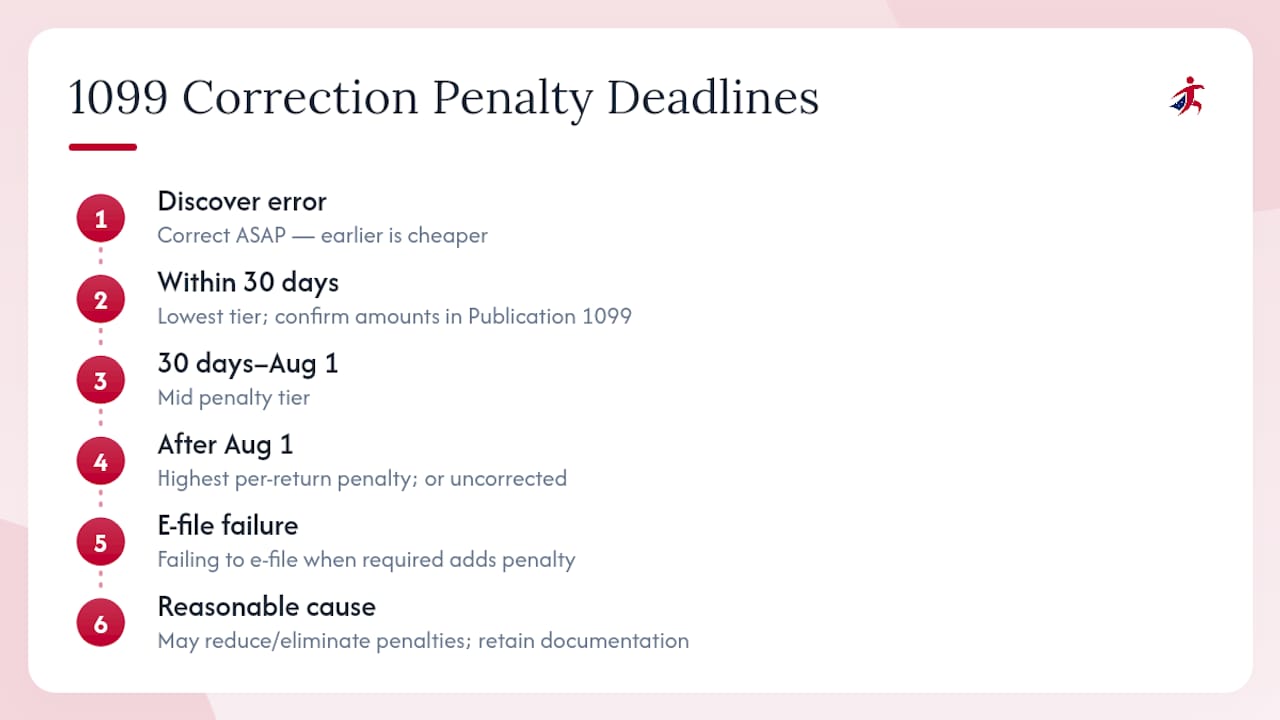
Penalty tiers increase the longer a correction is delayed. Correcting within 30 days of the original due date carries the lowest tier. Corrections made after 30 days but before August 1 fall into a mid-tier. Corrections filed after August 1, or not at all, carry the highest per-return penalty. The exact dollar amounts per tier are set by statute and adjusted periodically, so confirm current figures in the latest Publication 1099.
Failure to e-file when required — for example, filing a paper correction when the original was e-filed without an approved waiver — can trigger an additional penalty on top of the incorrect-information penalty.
Correct as early as possible. The penalty tiers for IRC 6721 and 6722 are time-sensitive: the same error costs significantly more if left uncorrected past the 30-day and August 1 thresholds. Filing a correction the week you discover the error is almost always cheaper than waiting until year-end.
Reasonable cause may reduce or eliminate penalties when a payer can show the error resulted from events outside their control and that they acted responsibly. To support a reasonable-cause claim, retain documentation showing when the error was discovered, what steps were taken to correct it, and any correspondence with the payee or IRS. Reasonable cause is not automatic — it requires a written explanation submitted with or in response to the penalty notice.
How and when should you furnish corrected statements to recipients?
The obligation to furnish a corrected payee statement runs parallel to the IRS filing obligation. Send the corrected Copy B (or equivalent recipient statement) to the payee as soon as you file the correction with the IRS — do not wait for IRS acknowledgement if you are e-filing, since acknowledgements can take a day or two.
What to include on the corrected payee statement:
- The CORRECTED checkbox marked clearly at the top
- All corrected amounts and codes, with incorrect fields replaced (not just the changed field)
- The payer’s name, address, and TIN
- Optionally, a correction date noted near the CORRECTED box to help the recipient identify which version supersedes the prior one
If a recipient does not receive a corrected statement, the IRS recommends that they contact the payer first. If the payer does not respond, the recipient may use Form 4852 as a substitute and contact the IRS directly. That outcome is avoidable — furnish corrected statements promptly.
Records to retain:
- Copy of the original return as filed
- Copy of every corrected return (Copy A and Copy B)
- Form 1096 transmittal copies for paper corrections
- E-file acknowledgement files and TCC logs for electronic corrections
- Payee notification records (delivery confirmation, e-delivery receipts)
Retain all correction records for at least four years from the due date of the return, consistent with general information return recordkeeping guidance.
Pro Tip: Store e-file acknowledgement numbers alongside the corrected PDF for each payee. If the IRS sends a CP2100 or B-Notice later, you can respond with the acknowledgement date and number as evidence that the correction was filed and accepted before the notice was generated.
When does a state correction require separate action from the federal correction?
Federal and state correction obligations are not always identical, and conflating them creates its own compliance risk. A federal corrected 1099 filed with the IRS does not automatically update state tax agency records.
Do not send a federal corrected return to the IRS when the change is state-only. If the only error involves state withholding, a state income code, or a state-specific field, contact the relevant state tax department directly. Filing a federal correction for a state-only change creates unnecessary IRS records and may trigger federal matching issues.
Common state-level correction requirements to verify:
- Some states require their own corrected transmittal form (separate from Form 1096).
- State deadlines for corrections may differ from the federal schedule.
- States participating in the Combined Federal/State Filing (CF/SF) program receive federal data automatically for certain form types, but not all corrections flow through CF/SF — check the state’s participation status and whether corrections are covered.
- States with their own 1099 filing portals (California, for example) may require direct submission of corrected returns through those portals.
Before mailing or e-filing any corrected return that affects state withholding or state-reported income, verify the specific state’s requirements. The IRS Publication 1099 lists CF/SF participant states, but each state’s revenue department is the authoritative source for correction procedures. For payers with employees or contractors who have moved internationally, IRS compliance obligations can extend beyond domestic state rules — resources covering IRS compliance for cross-border situations can help clarify when additional federal reporting applies.
How does an IRS-authorized e-file platform simplify 1099 corrections?
Filing corrections manually — whether on paper or through direct FIRE transmission — requires careful attention to form sequencing, TCC management, and acknowledgement tracking. An IRS-authorized e-file platform consolidates those steps and reduces the margin for procedural error.
Recommended e-file correction workflow using an authorized platform:
- Verify TINs before filing. Use the platform’s TIN-matching feature to confirm payee TIN/name combinations against IRS records before submitting any correction.
- Prepare corrections in bulk. Import corrected data via CSV or direct entry. The platform flags CORRECTED status on each return automatically.
- Review CORRECTED flags. Confirm that the CORRECTED checkbox is set on the right returns and that Type 2 corrections include both the zeroed return and the new return.
- Submit via authorized channel. The platform transmits to FIRE or IRIS using its own TCC, so individual payers do not need to manage TCC registration separately.
- Collect e-file acknowledgements. Acknowledgement files are stored in the platform dashboard, giving you a timestamped record of each accepted correction.
- Furnish corrected payee PDFs. Encrypted e-delivery sends the corrected Copy B to each recipient automatically, with delivery confirmation logged.
Security and compliance: Handling payee TINs and financial data during a correction requires the same data security standards as original filing. Platforms operating under SOC 2 certification and 256-bit encryption protect that data throughout the correction workflow.
Pro Tip: Use the e-file acknowledgement date as your baseline for recipient notification timing. If the IRS accepts your correction on a Tuesday, send the corrected payee statement that same day or the next. The gap between IRS acceptance and recipient notification is the window where a recipient might file using incorrect data — closing it quickly reduces downstream complications.
What payers consistently get wrong about 1099 corrections
Most correction errors are not technical. They are procedural — the result of acting too quickly without checking the right details first.
The most common mistake is using the VOID box instead of the CORRECTED box. Payers sometimes assume VOID cancels a previously filed return. It does not. The IRS scanning system ignores voided forms, so the original incorrect data stays on record. The only way to correct a filed return is the CORRECTED checkbox, with the proper Type 1 or Type 2 workflow.
A close second: filing a paper correction when the original was e-filed. If the original was e-filed and you file 10 or more information returns, the correction must be e-filed. Paper corrections submitted without an approved waiver are treated as non-compliant, which can trigger the failure-to-file-electronically penalty on top of the underlying correction penalty.
Late corrections are the third persistent problem. Payers often discover errors during year-end reconciliation — months after the original filing. By that point, the lowest penalty tier has already closed. Filing the correction immediately upon discovery, rather than waiting for the next filing season, limits exposure under both IRC 6721 and 6722.
A practical checklist for payers:
- Verify all payee TINs before filing originals (prevents most corrections entirely)
- Classify the error as Type 1 or Type 2 before preparing any forms
- Use the CORRECTED checkbox, never the VOID box, for filed returns
- E-file corrections when originals were e-filed or when the 10-return threshold applies
- Furnish corrected payee statements the same day as IRS submission
- Retain acknowledgement records, corrected copies, and Form 1096 transmittals for at least four years
Complex scenarios: If you need to correct a return that was itself a correction, treat the prior correction as the “original” for purposes of the new correction. Check the CORRECTED box on the new return and enter the accurate data. For returns with multiple simultaneous errors spanning both Type 1 and Type 2 categories, resolve the Type 2 error first (zeroed return plus new return), then address any remaining Type 1 issues on the new correct return.
TaxFormHero makes 1099 correction filing faster and lower risk
Correcting 1099s under time pressure, with penalty tiers ticking, is exactly where a purpose-built e-file platform pays for itself. TaxFormHero is an IRS-authorized e-file platform that handles the full correction workflow — from TIN verification through encrypted payee delivery — without subscriptions or setup fees.
For payers managing corrections across multiple payees or form types, TaxFormHero’s bulk import lets you upload corrected data in one pass, with CORRECTED checkbox support built into the form UI. State filing add-ons cover direct submission to 35+ states, so federal and state corrections move together. TIN matching runs before submission, catching the errors that generate Type 2 correction chains before they start. Every accepted filing produces a timestamped acknowledgement stored in your dashboard — the audit trail that supports reasonable-cause claims and responds to CP2100 notices.
Pricing starts at $1.99 per form with no annual commitment. Start your 1099 corrections on TaxFormHero and file with IRS-authorized confidence.
Sources
The sources below are the primary IRS references for 1099 correction filing. Each serves a distinct purpose in the correction process.
- Instructions for Forms 1099-MISC and 1099-NEC (12/2026)
- FIRE - Filing Information Returns Electronically
This article provides general information about IRS filing procedures and does not constitute legal or tax advice. Confirm current rules, penalty amounts, and deadlines with IRS publications or a qualified tax professional before filing.
This article is general information, not a substitute for advice from a qualified financial advisor. Consult a qualified financial professional about your own circumstances before acting on anything here.