
The IRS TIN Matching program is the official pre-filing tool that lets authorized payers verify that a payee’s name and Taxpayer Identification Number match IRS records before submitting information returns. Use Interactive TIN Matching for spot checks of up to 25 name/TIN pairs per session with instant results, and use Bulk TIN Matching for files of up to 100,000 records when results typically return within 24 hours. Both modes are free through IRS e-Services, but access requires completing e-Services registration and being listed on the Payer Account File (PAF).
Before you can run a single check, confirm three things: your organization has an active e-Services account with ID.me identity verification completed, your entity appears in the PAF, and you have selected the correct mode for your volume.
TL;DR — who should use which mode:
- Interactive: New vendor onboarding, single-vendor spot checks, CP2100 follow-up on a handful of payees. Results are instant.
- Bulk: Year-end 1099 prep, vendor master database cleanup, CP2100 remediation across large payee populations. Results typically return within 24 hours.
- Not applicable: Foreign payees covered by Form W-8 series. TIN Matching is for U.S. persons only.
Interactive vs. Bulk: how do you choose the right mode?
The decision between Interactive and Bulk TIN Matching comes down to volume, urgency, and workflow context. Neither mode is universally better; each fits a specific operational pattern.

| Dimension | Interactive | Bulk |
|---|---|---|
| Capacity per submission | Up to 25 name/TIN pairs | Up to 100,000 records per file |
| Turnaround | Instant (real-time) | Typically within 24 hours |
| Primary use case | Onboarding, spot checks | Year-end prep, database cleanup |
| File format required | Manual entry via e-Services UI | Fixed-width text file |
| Session/rate limits | Session caps and daily request caps apply | One file per submission cycle |
| Result delivery | On-screen immediately | Results file retrieved from e-Services |
Interactive is the right choice when you need an answer now. A new vendor submits a W-9 during onboarding, and you want to confirm the name/TIN pair before the relationship goes live. Or a CP2100 notice arrives for three payees and you need to triage quickly. Interactive handles both without any file preparation.
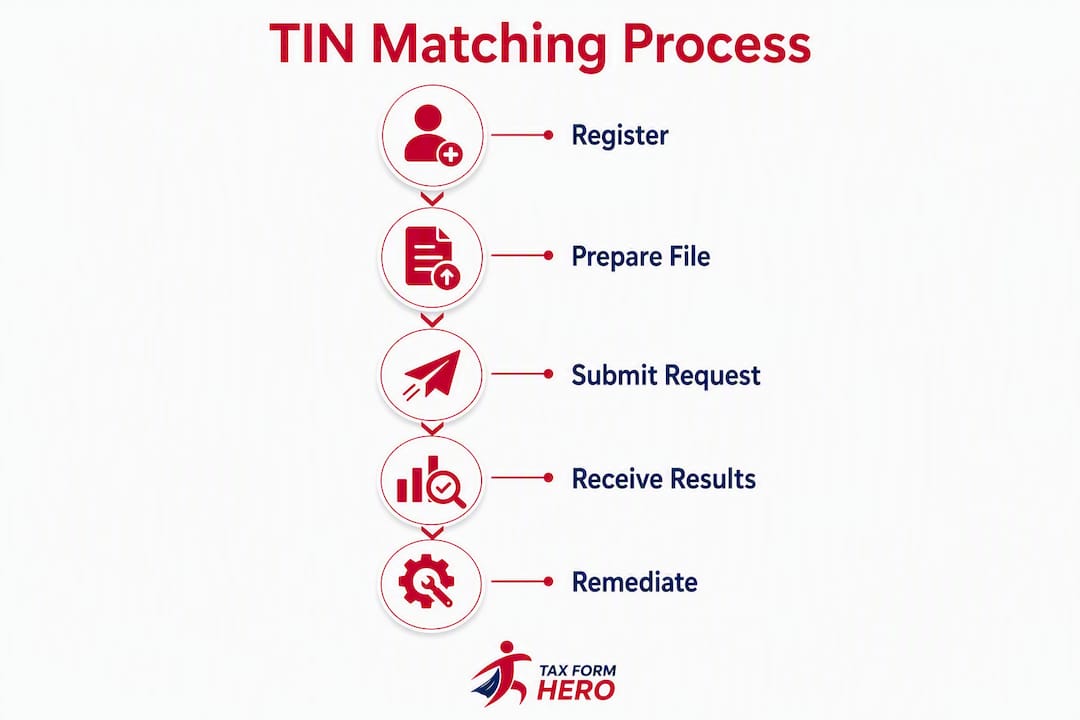
Bulk is built for scale. Running a full vendor master cleanup before the January 1099 filing deadline, or responding to a CP2100 notice that covers hundreds of payees, requires a file-based approach. The 24-hour turnaround is a reasonable trade-off for the volume it handles.
Decision checklist by common task:
- New vendor onboarding (1–25 vendors): Interactive
- New vendor onboarding (26+ vendors): Bulk
- Year-end 1099 pre-filing match: Bulk
- CP2100 remediation, small population: Interactive
- CP2100 remediation, large population: Bulk
- Periodic vendor master audit: Bulk
- Single corrected W-9 verification: Interactive
One operational constraint worth planning around: Interactive sessions have both session caps and daily request caps. During high-volume onboarding periods, teams that rely exclusively on Interactive can hit those limits and face delays. Structuring repeated sessions across business days, or shifting volume above 25 records to Bulk, prevents that bottleneck.
Filing one yourself? You can e-file Form W-2 online with TaxFormHero, an IRS-authorized e-filing platform.
Who is eligible, and how do you register for e-Services and the PAF?
TIN Matching is available to authorized payers of Form 1099 income subject to backup withholding under IRC section 3406(a)(1)(A) and (B), and to their authorized agents. The program covers the information return types listed in IRS Publication 2108-A, which includes the most common 1099 series forms. It does not extend to foreign payees or Form W-8 series situations.

PAF listing is the step most teams overlook. The Payer Account File is the IRS database that determines whether your organization can access TIN Matching. It is populated based on information return filing history. A new payer that has not yet filed at least one information return will not appear in the PAF, and therefore cannot access TIN Matching even after completing e-Services registration. Plan for this lag when onboarding a new entity.
Step-by-step registration path:
- Go to IRS e-Services at irs.gov and create an account, or log in if your organization already has one.
- Complete identity verification through ID.me, which requires a government-issued ID and a selfie or video call.
- Once verified, navigate to the TIN Matching application within e-Services and submit your application.
- Designate a Responsible Official and assign user roles (Responsible Official, Delegated User) as appropriate for your team.
- Wait for PAF confirmation. If your organization has filed information returns previously, access is typically granted promptly after application approval. New filers must file at least one return first.
Practical timeline: experienced filers with existing e-Services accounts and PAF listings can gain TIN Matching access within a few business days of application. New filers should budget several weeks to account for the first information return filing and PAF population lag.
Pro Tip: Assign the Responsible Official role to a senior team member who will remain with the organization long-term. Role mismatches during high-volume periods, such as a Responsible Official who has left the company, can lock out the entire team from e-Services access at the worst possible time. Document the role assignment and store credentials in a secure, shared location.
How does interactive TIN matching work, step by step?
Interactive TIN Matching is the fastest path to a verified result, but the quality of the input determines the quality of the output. Submitting a DBA name instead of the legal name from W-9 line 1 will produce a mismatch even when the underlying TIN is correct.
Data preparation before you log in:
- Pull the legal name exactly as it appears on line 1 of the payee’s W-9, not line 2 (which is for DBA or trade names).
- Format the TIN as nine consecutive digits with no dashes (e.g., 123456789, not 12-3456789).
- Confirm whether the TIN is an SSN or EIN, as the TIN type field affects how the IRS matches the record.
Step-by-step Interactive workflow:
- Log in to IRS e-Services and navigate to the TIN Matching application.
- Accept the terms of service for the session.
- Select “Interactive TIN Matching.”
- Enter up to 25 name/TIN pairs. Each entry requires: the payee name (from W-9 line 1), the TIN (nine digits, no dashes), and the TIN type (SSN or EIN).
- Submit the batch. Results appear on-screen immediately.
- Review each result code and take the appropriate next action (see the result codes section below).
- Export or print the results page and save it to your compliance file for that payee.
What each immediate result means operationally:
- Code 0 (Match): The name/TIN combination exists in IRS records. Proceed to file the information return.
- Code 1–3 (Formatting or data errors): Do not file until the issue is resolved. Request a corrected W-9.
- Code 4–8 (No match or specific mismatch): Investigate before filing. A no-match result does not automatically trigger backup withholding, but it does require documented follow-up.
After each session, create a brief record noting the date, the payees checked, the result codes received, and the follow-up action taken. This documentation supports a reasonable-cause defense if the IRS later issues a CP2100 notice for a payee you checked and remediated in good faith.
Note on session limits: Interactive sessions have daily request caps. During high-volume onboarding periods, structure your checks across multiple business days or shift larger batches to the Bulk process to avoid hitting those limits.
How do you prepare and submit a bulk TIN matching file?
The IRS bulk TIN matching format is fixed-width, and the system is unforgiving of formatting errors. A single extra space, an incorrect field length, or a leading zero stripped by Excel can trigger a Code 4 rejection or cause entire records to fail. Prepare the file in a plain-text editor after exporting a cleaned spreadsheet, not directly from Excel.
Fixed-width record layout
Each record in a bulk TIN matching file follows a compact, fixed-width structure. The key fields and their character positions are:
| Field | Position | Length | Format |
|---|---|---|---|
| TIN | 1–9 | 9 characters | Digits only, no dashes, leading zeros preserved |
| TIN Type | 10 | 1 character | 1 = SSN, 2 = EIN, 3 = Unknown |
| Name Control | 11–14 | 4 characters | First 4 characters of payee name, left-justified, space-padded |
| Filler | 15–32 | 18 characters | Spaces |
Each record is exactly 32 characters long. Any deviation in record length will cause the file to be rejected or individual records to fail with a Code 4.
Common formatting mistakes that cause rejections:
- Opening the file in Excel, which strips leading zeros from TINs (e.g., 012345678 becomes 12345678).
- Using comma delimiters or tab characters instead of the fixed-width format.
- Saving the file with UTF-8 BOM encoding instead of plain ASCII.
- Including a header row in the file (the IRS format expects data records only, no column headers).
- Using the DBA name instead of the legal name from W-9 line 1 for the name control.
- Padding the name control field with characters other than spaces.
Pre-submission checklist:
- Clean duplicate TINs from the file before submission.
- Standardize all payee names to the legal name on W-9 line 1.
- Set the TIN column to text format in your spreadsheet before export to preserve leading zeros.
- Remove all DBA references from the name control field.
- Validate that every record is exactly 32 characters.
- Save as plain ASCII text (.txt), no BOM, no header row.
- Confirm the file contains no more than 100,000 records.
Submission and tracking:
Upload the file through the e-Services TIN Matching interface. The system will assign a tracking number immediately upon upload. Record that tracking number. Results are typically available within 24 hours. When the results file is ready, download it from e-Services and map each result record back to your internal vendor ID using the TIN and name control fields.
Pro Tip: Before uploading to the IRS, open the .txt file in a plain-text editor and manually count the characters in the first three records. If any record is not exactly 32 characters, fix the export process before submitting. A full-file rejection wastes a processing day and delays your compliance timeline.
What do IRS result codes mean, and what should you do next?
Every record in an Interactive or Bulk TIN Matching response carries a result code. Knowing the remediation path for each code is what separates a team that clears mismatches efficiently from one that files incorrect returns and receives CP2100 notices.
| Code | Meaning | Immediate action |
|---|---|---|
| 0 | Name/TIN match | Proceed to file the information return |
| 1 | TIN missing or not 9 digits | Request corrected W-9; do not file until resolved |
| 2 | TIN not currently issued | Request corrected W-9; verify payee identity |
| 3 | Name/TIN combination does not match IRS records | Request corrected W-9; document the attempt |
| 4 | Invalid request (formatting error) | Fix the record format and resubmit |
| 5 | Duplicate request within the session or file | Remove duplicate and resubmit if needed |
| 6 | EIN not yet in IRS records (new EIN) | Wait 2–3 weeks and resubmit; document the delay |
| 7 | Name/TIN match for a deceased individual | Verify payee status; consult legal or tax counsel |
| 8 | SSN/EIN mismatch (wrong TIN type selected) | Correct the TIN type field and resubmit |
Remediation workflow for Code 3 (the most common mismatch):
- Send the payee a written request for a corrected W-9, specifying that the name on line 1 must match IRS records exactly.
- Document the date of the request and the method of delivery.
- Allow the payee a reasonable response window (typically 30 days).
- If the payee responds with a corrected W-9, re-run TIN Matching before filing.
- If the payee does not respond, consult IRS guidance on backup withholding requirements under IRC section 3406.
- Retain all correspondence and match results in the payee’s compliance file.
IRS penalties for incorrect information returns vary by timing and filer size, with higher penalties applying when errors are not corrected within specified windows. Documented remediation attempts, including TIN Matching results and W-9 correction requests, support a reasonable-cause defense and can reduce or eliminate penalty exposure.
One important limitation: a Code 0 match confirms that the name/TIN combination exists in IRS records. It does not confirm that the payee authorized the use of that TIN, and it does not detect fraudulent use of a valid TIN. For high-risk vendor relationships, supplement TIN Matching with identity verification procedures.
What causes TIN mismatches and file rejections, and how do you fix them?
Most real-world mismatches fall into a small number of repeatable categories. Fixing these at the source, rather than after a CP2100 notice arrives, is where the compliance effort pays off.
Name mismatch causes:
- Submitting the DBA or trade name (W-9 line 2) instead of the legal name (W-9 line 1).
- Using a nickname or shortened version of the legal name (e.g., “Bob” instead of “Robert”).
- Missing or incorrect suffixes (e.g., omitting “Jr.” or “LLC” when the IRS record includes it).
- Unreported legal name changes after a marriage, divorce, or business restructuring.
- Extraneous punctuation or special characters not present in the IRS record.
Data-entry and formatting issues:
- Dashes added or removed from TINs during manual entry.
- Leading zeros stripped when the TIN column is formatted as a number in Excel.
- Extra spaces before or after the name or TIN fields.
- Incorrect TIN type selection (SSN entered as EIN or vice versa).
Bulk submission failures:
- File encoding saved as UTF-8 with BOM instead of plain ASCII.
- Unexpected tab or comma delimiters in a file that should be fixed-width.
- Records that are not exactly 32 characters due to name control padding errors.
- Header rows included in the file.
Troubleshooting checklist (run in this order):
- Validate the file format locally: open in a plain-text editor and confirm record length on a sample of records.
- Confirm the name control uses the legal name from W-9 line 1, not a DBA or nickname.
- Verify the TIN is nine digits with no dashes and that leading zeros are preserved.
- Check the TIN type field (1 for SSN, 2 for EIN, 3 for unknown).
- If a Code 3 mismatch persists after format validation, contact the payee for a corrected W-9.
- Re-run TIN Matching after receiving the corrected W-9 before filing.
Pro Tip: Use a free hex editor or a command-line character count tool (e.g., wc -c on each line in a Unix/Linux environment) to verify that every record in your bulk file is exactly 32 characters before upload. This takes five minutes and prevents a full-file rejection that costs a processing day.
When and how often should you run TIN matching to reduce CP2100 risk?
TIN matching works best as a standing compliance control, not a one-time pre-filing task. A two-step approach, once at onboarding and again immediately before filing, catches both new mismatches and changes that occurred during the year.
Recommended cadence:
- At onboarding: Run Interactive TIN Matching for every new vendor or payee before the first payment is made. Catching a mismatch before the relationship is established is far less disruptive than correcting it after 1099s are filed.
- Quarterly (high-risk vendors): For vendors with high payment volumes or a history of W-9 issues, run a quarterly spot check using Interactive.
- Pre-filing (full bulk match): Run a complete Bulk TIN Matching pass against your entire 1099 payee population at least 30 days before the January filing deadline. This provides time to request corrected W-9s and re-run checks before the deadline.
How TIN matching fits into a broader 1099 compliance program:
- Collect W-9s before the first payment, not after. A missing W-9 is a compliance gap from day one.
- Document every TIN Matching run: date, mode, payees checked, result codes, and follow-up actions.
- Establish a B-Notice workflow: when a CP2100 or CP2100A notice arrives, the first step is to cross-reference it against your TIN Matching records to determine whether you already have documented remediation.
- Assign clear role ownership for TIN Matching runs, W-9 collection, and backup withholding decisions.
Policy suggestions:
- Retain match result files and W-9 correction correspondence for at least four years, consistent with general information return record-keeping practice.
- Create an escalation matrix: a single Code 3 mismatch goes to the AP team; a payee who has not responded to two W-9 correction requests within 60 days escalates to the tax department.
- Set a calendar reminder for the bulk pre-filing match no later than December 1 for calendar-year filers.
Compliance calendar example (calendar-year filer):
- January–March: Collect W-9s for all new vendors; run Interactive checks at onboarding.
- April–June: Quarterly spot check for high-risk vendors.
- July–September: Mid-year vendor master audit; identify payees with unresolved mismatches.
- October: Begin bulk file preparation; clean vendor master data.
- November–December 1: Run full Bulk TIN Matching pass; initiate W-9 correction requests for all non-matches.
- December: Re-run Interactive checks for corrected W-9s received; finalize backup withholding decisions.
- January (filing deadline): File 1099s with confidence that the payee population has been matched.
Sample fixed-width bulk records and a pre-upload checklist
The examples below show correctly formatted bulk TIN matching records in the IRS fixed-width layout. Each record is exactly 32 characters. Copy these into a plain-text editor to use as a template.
Annotated example records
EIN entry (TIN type 2):
123456789211AB
- Characters 1–9:
123456789(EIN, nine digits) - Character 10:
2(TIN type = EIN) - Characters 11–14:
11AB(name control, first 4 characters of legal name, left-justified) - Characters 15–32: 18 spaces (filler)
SSN entry (TIN type 1):
987654321 1SMIT
- Characters 1–9:
987654321(SSN, nine digits) - Character 10:
1(TIN type = SSN) - Characters 11–14:
SMIT(name control for “Smith, John”) - Characters 15–32: 18 spaces (filler)
Unknown TIN type (TIN type 3):
111223333 3JOHN
- Characters 1–9:
111223333(TIN) - Character 10:
3(TIN type = Unknown) - Characters 11–14:
JOHN(name control) - Characters 15–32: 18 spaces (filler)
Name control formatting notes
| Payee type | Name control rule | Example |
|---|---|---|
| Individual | First 4 characters of last name | Smith → SMIT |
| Corporation | First 4 characters of legal name | Acme Corp → ACME |
| Partnership | First 4 characters of legal name | 1st Street → 1ST |
| Special characters | Remove punctuation; use letters/digits only | O’Brien → OBRI |
Final pre-upload checklist:
- File encoding is plain ASCII (no UTF-8 BOM, no Unicode).
- No header row in the file.
- Every record is exactly 32 characters (validate with a text editor or command-line tool).
- TIN field contains nine digits only, no dashes, leading zeros preserved.
- Name control is exactly four characters, left-justified, space-padded if shorter.
- TIN type field is 1, 2, or 3 only.
- No more than 100,000 records in the file.
- File is saved as .txt.
- Duplicate TINs have been removed or intentionally retained with a reason documented.
To map bulk results back to your internal vendor IDs, maintain a reference file that links each TIN to your internal vendor number before submission. When the results file returns, join on the TIN field to identify which internal records need follow-up.
How can you automate TIN matching and integrate it into vendor onboarding workflows?
The IRS free tool is sufficient for organizations with straightforward filing populations and the staff time to manage fixed-width file preparation manually. For teams with high vendor turnover, large payee populations, or ERP-driven AP workflows, automation reduces manual errors and shortens the remediation cycle between a mismatch and a corrected filing.
Integration patterns:
- Real-time check at onboarding: Trigger a TIN verification call during the vendor setup workflow, before the vendor record is saved as active. This prevents payments from flowing to unverified payees.
- Scheduled bulk export: At defined intervals (monthly or pre-filing), export the active vendor master from your ERP, format it for bulk submission, submit to the IRS, and import results back into the vendor record.
- Hybrid flow: Use real-time checks for new vendors and scheduled bulk runs for periodic rechecks of the existing population. Route Code 3 and Code 8 exceptions to a manual review queue.
Security and governance considerations:
TIN data is sensitive personally identifiable information (PII). Any system that stores, transmits, or processes TINs should meet the security controls outlined in IT compliance standards for financial services, including encryption in transit (TLS 1.2 or higher), encryption at rest, access controls, and audit logging. For vendor-managed solutions, SOC 2 Type II certification is the baseline governance standard to require.
Vendor evaluation checklist for TIN verification solutions:
- Does the solution accept CSV or XLSX uploads, eliminating the need to manually construct fixed-width files?
- Does it deduplicate records before submission to avoid wasting match capacity on repeated TINs?
- Does it map IRS result codes back to your internal vendor IDs automatically?
- Does it provide audit-ready reports showing match history, result codes, and follow-up actions?
- Does it offer an API for real-time integration with your ERP or onboarding system?
- Is it IRS-authorized and SOC 2 certified?
What the IRS free tool does not provide: no API access, strict fixed-width file format with no flexibility, no deduplication, no internal ID mapping, and no audit reporting. These gaps are manageable for small filing populations but become significant operational costs at scale.
TIN Matching also has a scope limitation worth building into your governance framework: it validates U.S. persons only. For payees covered by the Form W-8 series, TIN Matching does not apply, and foreign TIN verification requires a separate process.
Key Takeaways
Accurate TIN matching at onboarding and again before filing is the most direct way to prevent CP2100 notices and reduce information return penalty exposure.
| Point | Details |
|---|---|
| Choose the right mode | Use Interactive for up to 25 spot checks with instant results; use Bulk for up to 100,000 records with results typically within 24 hours. |
| PAF listing is required | New payers must file at least one information return before the PAF is populated and TIN Matching access is granted. |
| Name from W-9 line 1 only | Submitting a DBA or nickname instead of the legal name on W-9 line 1 is the most common cause of Code 3 mismatches. |
| Document every match run | Retain result files and W-9 correction correspondence to support reasonable-cause defenses against IRS penalties. |
| Tax Form Hero simplifies the process | Tax Form Hero’s TIN verification add-on accepts CSV/XLSX uploads, maps result codes to internal IDs, and integrates with 1099 e-filing, eliminating fixed-width file preparation. |
The real friction in TIN matching is rarely the IRS tool itself
The IRS TIN Matching program is well-designed for what it does. The friction that AP and tax teams actually experience comes from the data that goes into it, not the system itself.
Name normalization is where most compliance programs lose time. A vendor master built over years accumulates DBA names, nicknames, outdated legal names, and punctuation inconsistencies that look fine internally but fail immediately against IRS records. The teams that handle TIN Matching efficiently are the ones that treat W-9 collection as a data quality exercise, not just a form-collection task. They enforce line 1 of the W-9 as the authoritative name source and build that discipline into their onboarding workflow before the first payment is made.
The other underappreciated constraint is the PAF lag for new entities. Organizations that spin up new legal entities, acquire subsidiaries, or restructure frequently often discover the PAF delay at the worst possible moment, weeks before a filing deadline. Planning for that lag, and running a bulk match as soon as PAF listing is confirmed, is the kind of operational detail that separates teams that file clean from teams that spend February responding to CP2100 notices.
The time cost of running TIN Matching is real, particularly for large vendor populations using the IRS fixed-width format. But the penalty risk of not running it is larger, and the documentation value of a clean match history is significant when the IRS does send a notice. The teams that treat TIN Matching as a standing control rather than a year-end scramble consistently spend less time on remediation.
Tax Form Hero makes TIN verification part of your filing workflow
Filing clean 1099s starts with verified payee data, and Tax Form Hero builds that verification directly into the e-filing process. Rather than managing fixed-width bulk files separately from your filing workflow, Tax Form Hero’s TIN verification add-on accepts CSV and XLSX uploads, deduplicates records automatically, and maps IRS result codes back to your internal vendor IDs. The result is an audit-ready report that documents every match attempt alongside your filing history.
Tax Form Hero is IRS-authorized and SOC 2 certified, with 256-bit encrypted data storage and direct state filing for 35+ states. There are no subscription fees: you pay per form filed, starting at a low per-form fee, with TIN verification available as an add-on. For accounting firms and AP teams managing large payee populations, the bulk import capability eliminates the manual file-formatting work that makes the IRS free tool time-consuming at scale.
To get started, create your Tax Form Hero account, upload a small batch of payee records to test the TIN verification workflow, and review the result code mapping before your next filing cycle. Enterprise teams with ERP integration requirements can contact the Tax Form Hero team directly through the platform.
Authoritative sources and further reading
The sources below are the primary references for IRS TIN Matching procedures, eligibility rules, and penalty guidance. Verify current rules directly with IRS.gov before each filing season, as procedures and penalty amounts are subject to update.
- IRS TIN Matching Tools overview: the primary IRS page covering both Interactive and Bulk modes, eligibility, and program scope.
- IRS TIN Matching program page (Tax Professionals): e-Services registration guidance, PAF requirements, and authorized payer definitions.
- IRS Publication 2108-A (Rev. 11-2024): the official procedural publication governing the TIN Matching program, including file format specifications and program rules.
- IRS Information Return Penalties: current penalty amounts, timing thresholds, and reasonable-cause guidance for incorrect or missing information returns.
- LegalClarity: How to Verify a TIN Number Using IRS TIN Matching: a practitioner-oriented walkthrough of result codes and remediation workflows.
This article provides general informational guidance on IRS TIN Matching procedures. It is not legal or tax advice. Confirm current rules and penalty amounts with IRS.gov or a qualified tax professional before filing.
Recommended

File Information Returns With Confidence
TaxFormHero supports 20+ IRS information returns, including 1099 and W-2 forms, with bulk Excel import, name/TIN matching and encrypted recipient delivery.
Explore TaxFormHero