
E-delivery is the better default for speed, cost, and security, provided you follow IRS consent, notice, and access requirements. Mail is required whenever a recipient hasn’t given valid affirmative consent, or when you can’t confirm they can actually access the electronic statement. The choice isn’t really “which is better.” It’s whether your organization has met the specific conditions that make e-delivery legal in the first place.
Five checkpoints determine which method you’re allowed to use for a given recipient:
- The recipient gave affirmative, documented consent to receive the statement electronically.
- You sent a compliant notice confirming the statement is available, including the required language when posted to a website.
- The recipient can print or save the form in the format provided.
- You can retain access to the posted statement for the required window.
- You have a mail fallback ready for any notice that bounces or goes undeliverable.
A payroll department with a documented consent flow and an authenticated portal can e-deliver confidently. A staffing firm that emailed a PDF attachment to a contractor’s personal address with no consent on file needs to mail that 1099, full stop. As Publication 1179 makes clear, consent isn’t a formality. It’s the legal hinge the entire method depends on.
Key Takeaways
Compliant e-delivery beats mail on speed and cost, but only when consent, notice, and access requirements are documented and enforced.
| Point | Details |
|---|---|
| Consent is the gatekeeper | Never treat e-delivery as default; confirm documented affirmative consent before skipping mail. |
| Notice wording is not optional | Use the required subject line for website-posted statements and confirm access instructions are clear. |
| Mail fallback must be automatic | Undeliverable electronic notices require mail within 30 days if the address can’t be fixed. |
| Hybrid delivery reduces risk | Combine e-delivery for consenting recipients with mail for everyone else during transition periods. |
| TaxFormHero automates the compliance layer | The platform handles TIN verification, secure hosting, notifications, and logs starting at $1.99 per form. |
Need to get this filed? You can e-file Form 1099-NEC online with TaxFormHero, which is IRS-authorized and charges per form, not per month.
Operational Differences: Speed, Cost, and Support Burden
Once consent is squared away, the operational case for e-delivery is fairly one sided, though not universally.
Speed. A recipient with portal access can view their 1099 the moment it’s posted. Mail depends on print runs, USPS transit, and whatever backlog your mailroom has that week. During peak filing season, that gap can stretch to a week or more.
Cost. Printing, envelopes, postage, and manual stuffing add up per form, and those costs scale linearly with volume. E-delivery costs are usually a flat per-form platform fee that doesn’t move much whether you’re sending 50 forms or 5,000. Organizations filing in bulk tend to see the biggest relative savings.
Recipient support. Here the picture is mixed. E-delivery cuts “where’s my form” calls for tech comfortable recipients but generates its own friction: login issues, forgotten passwords, or “I never got the notice” tickets. Mail generates fewer access complaints but more “it never arrived” claims that are hard to verify.
- E-delivery: faster access, lower unit cost, some portal support overhead.
- Mail: predictable for recipients without reliable internet access, but slower and costlier at scale.
- Reconciliation is easier with e-delivery because access logs prove viewing; mail relies on you trusting the postal system.
Pro Tip: Run a hybrid model your first season. E-deliver to consenting recipients and mail everyone else automatically. It’s the pragmatic default most service bureaus recommend for organizations with mixed-tech recipient bases.
What Does the IRS Require for Electronic 1099 Delivery?
The rules aren’t complicated, but they’re specific, and missing one piece can invalidate the whole delivery.
- Capture affirmative consent. The recipient must actively agree to electronic delivery in a way that demonstrates they can access the statement in the format you’ll actually use. A pre-checked box or silence doesn’t count. Consent obtained electronically must be given in a manner that reasonably demonstrates the recipient can access the form as provided, per Publication 1179.
- Send a compliant notice. If you’re posting the statement to a website, 26 CFR §1.529A-7 requires the notice email to carry the exact subject line “IMPORTANT TAX RETURN DOCUMENT AVAILABLE,” along with instructions for accessing the form.
- Keep it available and retained. Statements must remain accessible for the required window, and you need to be able to prove that availability if the IRS asks.
- Handle corrections properly. A corrected statement triggers its own notification cycle. Recipients need to know a correction exists and where to find it, not just that the original form was updated.
- Fall back to mail on bounces. If an electronic notice comes back undeliverable and you can’t get a working address, the same CFR section requires you to mail the notice within 30 days.
Filing and furnishing timing run on separate clocks. Publication 1099 confirms you meet the filing deadline by e-filing through IRIS by 11:59 p.m. on the due date, or by timely mailing via USPS or an IRS-designated private delivery service. Filers submitting 10 or more returns generally must e-file, which means securing a Transmitter Control Code through the IRIS e-file system well before deadline week, not the night before.
Which Delivery Channels Actually Meet IRS Security Standards?
Not every “electronic” method clears the bar. Plain email attachments carrying a PDF with a Social Security number are a liability, not a delivery method. Email has no reliable access control, no audit trail, and no way to confirm the intended recipient actually opened it rather than a shared inbox or a forwarded copy.
Three channel types generally hold up:
- Authenticated recipient portals that require login credentials before displaying the form.
- Encrypted download links gated behind identity verification, not a bare URL sent in plain text.
- Secure vendor-hosted repositories built specifically for tax document delivery, with access logging built in.
Consent flows should do more than collect a checkbox. The strongest designs include a test view step, where the recipient must actually open a sample document before consent is recorded, plus a time-stamped acceptance log. That combination directly addresses IRS guidance on furnishing electronically, which expects proof that the recipient could access the format, not just that you sent something.
Pro Tip: Keep three log types indefinitely, not just through filing season: access logs showing when each recipient viewed their form, notice logs proving you sent the required notification, and bounce reports documenting any mail fallback triggered by an undeliverable address. These three records are what actually protect you if a recipient later disputes receipt.
How to Switch From Mailed to Compliant E-Delivery
Moving an entire recipient population from paper to electronic delivery works best as a staged process, not a single flip.
- Pre-season setup. Choose a platform and verify its credentials, including IRS authorization and SOC 2 certification. Test the full consent and access flow yourself before recipients ever see it, and finalize your consent language in advance.
- Collect consent early. Give recipients enough lead time to respond, confirm each person can actually open the format you’ll use, and store every consent record with a timestamp. Build a clear process for non-responders instead of assuming silence means agreement.
- Execute delivery day carefully. Upload forms, post them to the secure channel, and send notices immediately after. Monitor for bounces in real time and trigger mail fallback automatically for anything undeliverable.
- Close out after delivery. Archive every form and log, maintain a clean corrections process, and honor any recipient request for a paper copy without argument.
Pro Tip: Don’t wait until January to test your consent flow. Run it on a small internal group in November so any friction points surface before recipients are involved.
How TaxFormHero Handles E-Delivery Compliance
Most of the risk in e-delivery comes from doing it manually. Spreadsheets tracking consent, a shared inbox for notices, a separate system for logs. TaxFormHero was built specifically to remove that patchwork.
The platform is IRS-authorized and SOC 2 certified, and it handles encrypted e-delivery alongside bulk import, TIN verification, and state filing add-ons across 35-plus states, with per-form pricing starting at $1.99 and no subscription required.
- Consent capture is built into the workflow rather than tracked separately.
- Forms are hosted on a secure, authenticated system rather than emailed as attachments.
- Notifications go out automatically once forms are posted.
- Delivery and access logs are stored for audit readiness without extra setup.
A typical run looks like this: an administrator uploads a batch of forms, TaxFormHero verifies TINs and posts the statements, recipients get a secure notification, and the platform retains the access logs and consent records in case they’re ever needed.
The compliance burden of e-delivery isn’t the concept, it’s the paperwork trail behind it. A platform that automates consent, hosting, and logging turns a five-step legal requirement into one upload.
Serving Recipients Without Reliable Digital Access
E-delivery works only when the recipient can actually use it, and that’s not universal. Some contractors don’t have consistent internet access. Some older recipients are uncomfortable navigating a login portal. Some simply prefer paper for their own recordkeeping.

None of that is a compliance problem so long as you build for it from the start. The IRS framework already assumes some recipients won’t consent, which is exactly why mail fallback isn’t optional; it’s baked into the rules. If a recipient never opts into electronic delivery, or later asks to switch back to paper, mail becomes the required method for that person, not an inconvenient exception.
Practical accommodations that reduce friction:
- Offer a plain-language choice at the point of consent: “electronic” or “paper by mail,” with no default pre-selected toward one.
- Make paper opt-out or opt-in easy to reverse, not a one-time irrevocable decision.
- Watch for recipients who consented but never actually log in. A pattern of unopened notices is a sign someone needs mail, regardless of what a consent form says.
- Keep a phone or paper request line open for recipients who struggle with digital forms, especially seasonal or lower-wage workers who may not check email regularly.
Accessibility here isn’t a favor. It’s the fallback the regulations require, and building it in from the start avoids a scramble every time someone’s electronic notice bounces.
What Does Good Consent Documentation Actually Look Like?
The businesses that get audited without incident share a common pattern: they treat consent as a record to be defended, not a checkbox to be collected.
A standardized consent process usually includes a clear disclosure of what electronic delivery means, a required action showing the recipient can view the format (not just agree to terms), and a stored, time-stamped record of that acceptance. The deep-dive guidance on furnishing Form 1099-G electronically lays out this exact approach, and it applies just as well to 1099-NEC, 1099-MISC, and other information returns.
What doesn’t hold up: consent implied by a recipient simply using an online portal for something unrelated, consent bundled into a broader terms-of-service agreement without a specific tax-document disclosure, or consent collected once and never revisited even after years of inactivity.
Best practice treats consent renewal seriously. If a recipient hasn’t logged into a portal in two or three years, some organizations require reaffirming consent before relying on it again. That’s not required by the IRS explicitly, but it closes the gap between “technically consented once” and “can actually access the current statement,” which is the standard that actually matters if a dispute arises.
Security Standards That E-Delivery Systems Should Meet
Encryption is the baseline, not the whole story. A compliant e-delivery system needs authentication before display, meaning the recipient proves who they are before the form appears, not after. Session timeouts, secure password reset flows, and encrypted data at rest all matter more than most administrators initially assume.
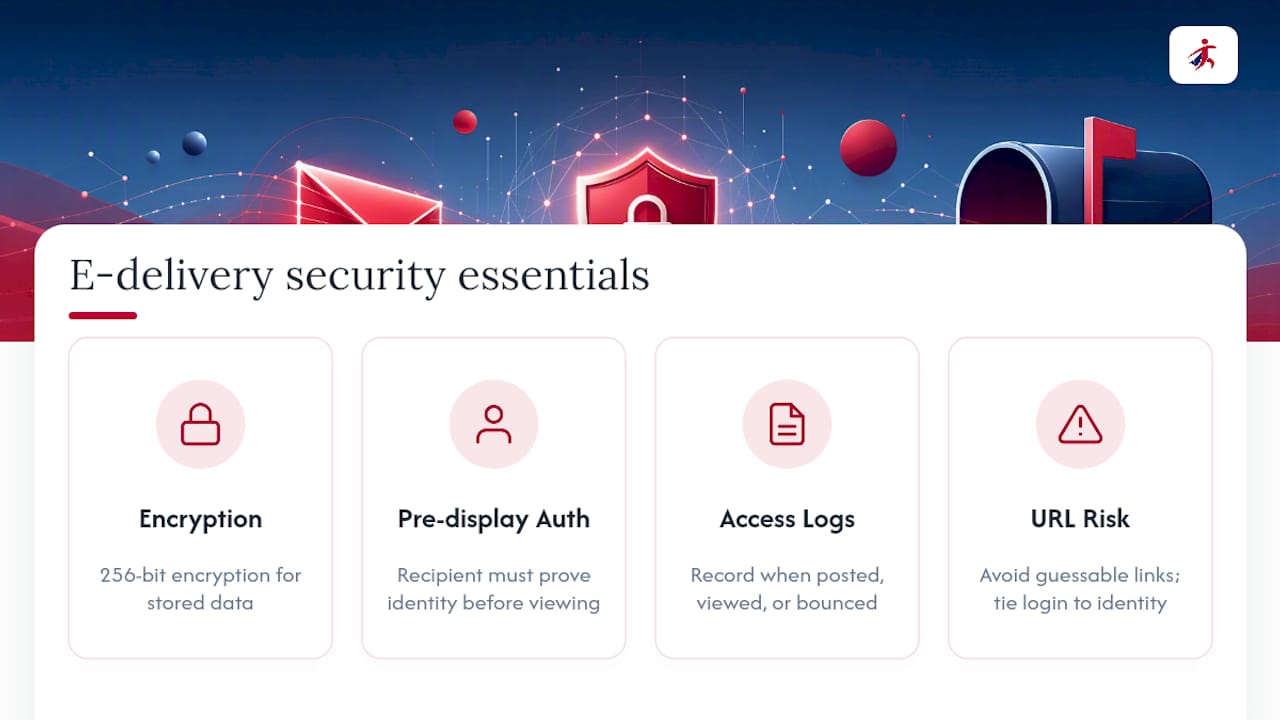
Vendor-hosted repositories built for tax documents typically apply 256-bit encryption for stored data and enforce login verification tied to the recipient’s identity rather than a guessable link. That distinction matters because a link anyone with the URL can open isn’t meaningfully different from an email attachment, even if the underlying file is encrypted.
Logging is the other half of the technical picture. A system that records when a form was posted, when the recipient viewed it, and when any notice bounced gives you the evidence trail the IRS framework implicitly expects. Industry guidance consistently points to this combination, secure hosting plus documented access, as the standard vendors build toward when automating 1099 delivery.
Do Recipients Actually Prefer E-Delivery Over Mail?
Preference splits along predictable lines, and it’s worth planning for both rather than assuming one wins outright.
Younger recipients and those already managing most of their finances digitally tend to prefer instant portal access. They don’t want to wait on mail, and they’re comfortable logging into a system once a year. Independent contractors managing multiple 1099s from different payers often prefer e-delivery specifically because it’s easier to organize digital copies across clients than to track a stack of envelopes.
Other recipients, particularly those less comfortable with online accounts or without consistent broadband, still prefer paper. For them, a physical form arriving in the mail is simply more trustworthy and easier to file away.
The satisfaction gap tends to show up not in the delivery method itself but in how well the notification is handled. Recipients who get a clear, well-timed notice with simple access instructions report fewer complaints regardless of channel. Recipients who get a confusing notice, or none at all, complain about e-delivery even when the underlying system works fine. The lesson for administrators is straightforward: the notice quality matters as much as the delivery method.
Why Compliance, Not Convenience, Should Drive This Decision
Most guidance on this topic treats e-delivery as a modernization upgrade, something you adopt because it’s faster and cheaper. That framing misses the actual risk. The real question isn’t whether e-delivery is better. It’s whether your organization can prove, on demand, that every step of the IRS’s consent and notice framework was followed for every recipient you didn’t mail.
The businesses that get burned aren’t the ones using paper too long. They’re the ones who adopted e-delivery without building the consent trail, the access logs, or the mail fallback that the rules actually require. Convenience without documentation is where audit exposure lives.
The right first move isn’t picking a delivery method. It’s building a consent and logging process that would hold up if a recipient later claimed they never got their form. Everything else, portal design, notification timing, cost savings, is secondary to that one structural decision.
Get Compliant E-Delivery Set Up Before Your Next Filing Deadline
Building your own consent tracking, secure hosting, and notification system from scratch means solving the same compliance puzzle every payroll department eventually runs into: proving access, not just sending a file. TaxFormHero handles that puzzle for you. The platform combines IRS-authorized e-filing with encrypted e-delivery, bulk import for high-volume filers, TIN verification to catch errors before they become penalties, and state filing coverage across 35-plus states, all billed per form starting at $1.99 with no subscription commitment.

For a payroll team or accounting firm juggling both mailed and electronic recipients this season, that means one dashboard instead of a spreadsheet, an email inbox, and a print vendor stitched together manually. Upload your recipient list, let the platform verify TINs and manage consent-based delivery, and download your audit trail when you need it. Start a filing on TaxFormHero and see your per-form cost before you commit to a single form.
Frequently Asked Questions
Is e-delivery legal for 1099 forms without recipient consent? No. Affirmative consent is a hard requirement under Publication 1179. Without it, you must mail the statement.
Can I email a 1099 as a PDF attachment? That approach is not recommended and generally doesn’t meet IRS security expectations. Use an authenticated portal or encrypted download link instead of a plain email attachment.
What happens if an e-delivery notice bounces? You must attempt to correct the electronic address, and if that fails, furnish the notice by mail within 30 days, per 26 CFR §1.529A-7.
Does e-filing with the IRS replace furnishing the form to the recipient? No. E-filing through IRIS satisfies your obligation to the IRS. Furnishing to the recipient, by mail or compliant e-delivery, is a separate requirement with its own rules.
How long must electronically posted 1099 statements remain available? Availability windows are set by Publication 1179’s electronic delivery rules, and you should retain access and consent records well beyond that window in case of an IRS inquiry.
Sources
- Publication 1099 (2026), General Instructions for Certain Information Returns | Internal Revenue Service
- Publication 1179 — General Rules and Specifications for Substitute Forms
- 26 CFR §1.529A-7 — Notice and posting rules for electronic statements
- Filing information returns electronically (IRIS) — Internal Revenue Service
- How to deliver 1099 forms to recipients — Avalara
Recommended

File Information Returns With Confidence
TaxFormHero supports 20+ IRS information returns, including 1099 and W-2 forms, with bulk Excel import, name/TIN matching and encrypted recipient delivery.
Explore TaxFormHero