
If you file 10 or more information returns in aggregate, you are required to e-file — and for most applicable large employers (ALEs), that threshold is crossed well before you count a single Form 1095-C. The fastest compliant path is either direct transmission through the IRS ACA Information Returns (AIR) system or submission through an IRS-authorized e-file provider. Either way, you will need a Form 1094-C Authoritative Transmittal, a valid Transmitter Control Code (TCC), and XML files that conform to AIR schema rules.
Before you open a single spreadsheet, confirm three things:
- ALE status and return count: An ALE is generally an employer with a large workforce, typically around fifty or more full-time employees (including full-time equivalents) in the prior calendar year. Count all information returns across form types — not just 1095-Cs — to determine whether the 10-return e-file threshold applies to you.
- TIN and EIN accuracy: Every Form 1095-C submission must carry a valid EIN. Invalid or missing EINs cause outright rejection, not just a warning.
- AIR access method: Choose between the Application-to-Application (A2A) channel for automated integrations or the Web Browser-based User Interface (UI) for manual uploads. Alternatively, engage an IRS-authorized transmitter who handles AIR access on your behalf.
TL;DR for the 2026 filing season: Paper returns for tax year 2025 were due February 28, 2026. Electronic submissions are due March 31, 2026. Employee furnishing deadlines apply separately. Every AIR transmission requires a Manifest, a Form Data File in uncompressed XML, and a Receipt ID to track acknowledgement status.
Who must e-file 1095-C, and what are the deadlines?
The 10-return threshold and ALE applicability

Starting with tax year 2023, any filer with 10 or more information returns in aggregate must file electronically. That aggregate count is the critical detail most employers miss. A mid-size employer filing 8 Forms 1095-C and 6 Forms W-2 already exceeds the threshold and must e-file both. The IRS does grant hardship waivers, but they require advance application and are not automatic.
ALEs — employers with 50 or more full-time employees in the prior calendar year — must file Forms 1094-C and 1095-C under Section 6056. Smaller employers sponsoring self-insured plans generally use Forms 1094-B and 1095-B instead, though the same aggregate e-file threshold applies to their information return volume.
Key deadlines for the 2026 filing season
| Filing Method | IRS Filing Deadline | Employee Furnishing Deadline |
|---|---|---|
| Paper filings for the year following the calendar year are generally due in late February; employee furnishing deadlines fall in early March. | ||
| Electronic filings for the year following the calendar year are generally due by the end of March; employee furnishing deadlines fall in early March. | ||
| Corrected 1095-C (electronic) | As soon as practicable | Within 30 days of correction |
Per the Instructions for Forms 1094-C and 1095-C, paper returns are due February 28 and electronic returns are due March 31 of the year following the calendar year reported. The furnishing deadline for employees is separate and generally falls in early March regardless of whether you file on paper or electronically.
Why the Authoritative Transmittal matters
Every ALE must file exactly one Form 1094-C designated as the Authoritative Transmittal. This transmittal reports summary information the IRS uses to verify the completeness of your submission. An AIR batch submitted without a properly designated Authoritative Transmittal will fail validation. Corrected Authoritative Transmittals follow a separate submission path covered in a later section.
Filing one yourself? You can e-file Form 1095-C online with TaxFormHero, an IRS-authorized e-filing platform.
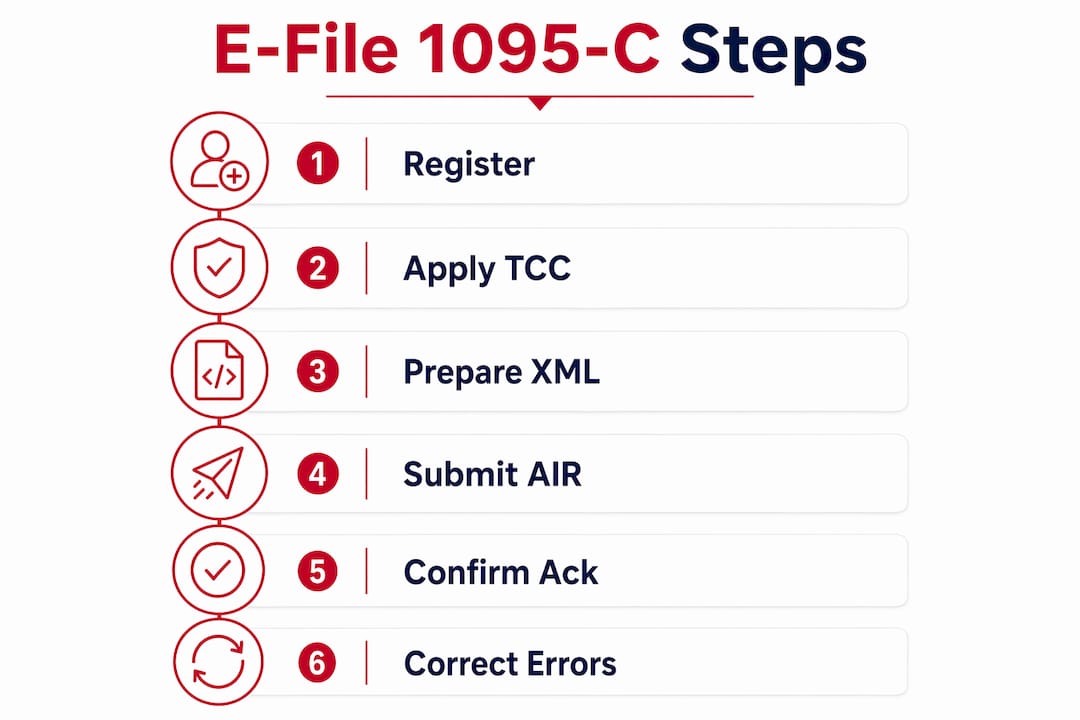
How do you e-file Forms 1094-C and 1095-C step by step?
Pre-submission preparation
- Reconcile payroll and HR data. Pull full-time employee lists using the 4980H look-back measurement method. Confirm that every employee’s offer-of-coverage codes, safe harbor codes, and plan start months are accurate for each month of the reporting year.
- Validate TINs and SSNs. Run TIN matching against IRS records before you build your XML. A single invalid SSN on a Form 1095-C record will generate a record-level rejection in the AIR acknowledgement.
- Confirm your EIN. Every submission must carry the employer’s valid EIN. Submissions with a missing or incorrect EIN are not processed.
- Prepare the XML Form Data File and Manifest. The Form Data File must be uncompressed, unencrypted XML conforming to the current AIR schema. The Manifest is a separate XML file that describes the transmission contents.
- Select your transmission channel. The AIR system offers two channels: A2A for automated system-to-system transmission and the Web UI for manual browser-based uploads.
Transmission and acknowledgement
- Register for IRS e-Services and obtain a TCC if you are transmitting directly. (See the enrollment section below for lead times.)
- Run AIR test transmissions. The IRS requires transmitters to complete testing before live submissions. Test files must conform to the same schema and naming rules as production files.
- Upload the transmission. Submit the Manifest and Form Data File together. AIR returns a Receipt ID immediately upon successful upload.
- Retrieve the Acknowledgement. Use the Receipt ID to pull the detailed Acknowledgement file, which shows whether the submission was accepted, accepted with errors, or rejected at the record level.
Post-submission reconciliation
- Match accepted records back to payroll. Confirm that the number of accepted 1095-C records equals your expected employee count. Discrepancies signal missing or rejected records that require correction.
- Retain all Receipt IDs and Acknowledgement files. These are your proof of timely filing and are required for any penalty defense.
Pro Tip: Build your reconciliation step into the workflow before you transmit, not after. Comparing your payroll headcount to the record count in your XML manifest takes minutes and catches truncated files before they reach AIR.
What are the AIR technical requirements for 1095-C submissions?
AIR accepts only XML. A transmission consists of two components: a Manifest and a Form Data File. The Form Data File must be uncompressed and unencrypted; compressed or encrypted files will be rejected outright. The Form Data File cannot exceed AIR’s payload size limit, which means large employers with thousands of employees may need to split submissions across multiple transmissions.

File naming and sequencing rules
Per Publication 5258, file names must include the form type, the Transmitter Control Code, the request type, and a GMT timestamp. TCCs are five-character alphanumeric codes with no lowercase characters. They appear in both the file name and the Manifest fields. Getting either wrong causes an immediate structural rejection.
Within the Form Data File, each submission carries a Submission ID (SID) and each Form 1095-C record carries a Record ID (RID). RIDs must start at 1 and increment sequentially without gaps within a submission. A gap in RID sequencing is a fatal error.
| Technical Element | Requirement |
|---|---|
| File format | Uncompressed, unencrypted XML |
| TCC format | Five-character alphanumeric, no lowercase |
| RID sequencing | Starts at 1, no gaps within a submission |
| B and C submissions | Cannot be commingled in one Form Data File |
| Receipt ID | Returned by AIR after upload; required to retrieve Acknowledgement |
Common fatal errors
- Missing or malformed TCC in the file name or Manifest
- Commingled B and C submissions in a single Form Data File (AIR rejects the entire file)
- RID gaps or duplicate RIDs within a submission
- Invalid SSNs or EINs at the record level
- Malformed Manifest entries that do not match the Form Data File contents
- File size exceeding the payload limit without splitting into separate transmissions
Pro Tip: Validate your XML against the published AIR schema locally before uploading. Most XML editors support schema validation, and catching a missing required attribute on your workstation is far faster than waiting for an AIR rejection acknowledgement.
How do you register for IRS e-Services and get a TCC?
IRS e-Services enrollment
Transmitters must register for IRS e-Services before applying for a TCC. The enrollment process requires identity verification, which the IRS now conducts through ID.me. Allow time for this step — identity verification can take several days if documents require manual review.
Once enrolled in e-Services, transmitters access the AIR UI or the A2A channel credentials needed for live submissions. Both channels require active e-Services credentials tied to the transmitter’s EIN.
Applying for a Transmitter Control Code
A TCC is mandatory for any organization transmitting directly to AIR. The application is submitted through the IRS e-Services portal. Lead times vary, but plan for several weeks between application and TCC issuance, particularly during peak filing season. TCCs are specific to the form type being transmitted.
The operational decision points:
- Transmit in-house via A2A: Best for large employers or payroll bureaus with technical staff who can build and maintain XML pipelines. Requires a TCC, e-Services enrollment, and completed AIR testing.
- Transmit in-house via Web UI: Suitable for smaller batches or employers who prefer manual uploads. Still requires a TCC and e-Services enrollment.
- Use an IRS-authorized transmitter: The transmitter holds the TCC and handles AIR submission on your behalf. You supply the data; they manage schema compliance, testing, and acknowledgement retrieval. Document the delegation in writing, including the transmitter’s TCC and their responsibility for corrected submissions.
If you choose a third-party transmitter, confirm they are listed as an IRS-authorized e-file provider for ACA returns and that they can supply Receipt IDs and Acknowledgement files for your records.
When and how do you file corrected or replacement 1095-C submissions?
Corrected Form 1095-C records
When a previously accepted Form 1095-C contains an error, you must submit a corrected record. In the XML submission, corrected records are marked with a correction indicator. The corrected submission must include the same SID/RID structure as a new submission, and the correction indicator must be set at the record level for each affected 1095-C.
Submit corrections as soon as the error is identified. The IRS does not set a hard deadline for corrections, but late corrections increase penalty exposure, particularly if the error affects an employee’s tax filing.
Corrected Authoritative Transmittal submissions
This is the case that trips up many practitioners. When a previously submitted and processed Form 1094-C Authoritative Transmittal requires correction, the corrected transmittal must be submitted alone — without any accompanying Form 1095-C records. Including 1095-C records in a corrected Authoritative Transmittal submission will cause the correction to fail.
Best practices for batching corrections
- Group corrections by submission batch to minimize the number of separate transmissions.
- Retain the original Receipt ID alongside the corrected submission’s Receipt ID so you can trace the full correction history.
- Reconcile corrected records back to your payroll system and update employee records before furnishing corrected copies.
- If an employee’s SSN was incorrect in the original submission, treat the corrected record as a priority — SSN errors affect IRS matching and can trigger notices to employees.
What causes AIR rejections and how do you fix them?
Most AIR rejections fall into a small number of categories. Knowing which acknowledgement fields to read first saves significant time.
Top rejection causes
- Invalid or missing EIN/SSN: Record-level rejections that require corrected records for each affected employee.
- Incorrect RID or SID sequencing: A gap or duplicate in the RID sequence invalidates the entire submission, not just the affected record.
- Malformed XML attributes: A missing required attribute or an attribute value outside the allowed enumeration causes a structural rejection.
- Commingled B and C submissions: Placing Forms 1095-B and 1095-C records in the same Form Data File causes an immediate file-level rejection.
- TCC format errors: A lowercase character or incorrect character count in the TCC field fails at the Manifest level before any records are evaluated.
Reading AIR acknowledgements
AIR returns two types of acknowledgement signals. A structural rejection means the entire file failed before record-level processing began — check the Manifest and file naming first. A record-level rejection means the file was accepted but specific records failed validation — the Acknowledgement file will identify the failing RIDs and the error codes.
Use the Receipt ID to retrieve the full Acknowledgement. The Acknowledgement file contains error codes mapped to specific records, which tells you exactly which employees’ data needs correction.
Pro Tip: Keep a running log of Receipt IDs, submission dates, and acknowledgement outcomes in a simple spreadsheet. When the IRS sends a penalty notice months later, that log is the fastest way to prove timely filing and identify which records were accepted.
What are the penalties for late or missing 1095-C filings?
Penalty exposure under the ACA information reporting rules is real and scales with the size of your workforce. The IRS enforces penalties under Sections 6721 (failure to file correct information returns) and 6722 (failure to furnish correct payee statements). Penalty amounts are adjusted annually for inflation and vary based on how late the filing is and whether the failure was due to intentional disregard.
Reducing penalty risk requires documented, proactive steps:
- Perform TIN matching before submission to catch SSN/EIN mismatches before they become record-level rejections.
- Document corrective actions with dates, Receipt IDs, and the specific records corrected.
- Retain proof of transmission: Keep Manifest files, Acknowledgement files, and Receipt IDs for at least four years.
- Retain employee furnishing records: Keep copies of mailed forms, website notice screenshots, and electronic consent records for the same period.
- Document hardship waiver applications if you filed for a waiver of the e-file requirement.
The IRS may abate penalties for reasonable cause. A well-documented correction history, combined with proof of timely original transmission, is the strongest reasonable-cause argument available.
How do you furnish Form 1095-C to employees?
The website-posting option
Effective January 31, 2024, employers may meet the furnishing requirement by posting a clear, conspicuous notice on their website and furnishing a copy upon employee request, instead of automatically mailing a paper form to every employee. The website notice must include the employer’s email address, mailing address, and telephone number. It must be written in plain language with a font size large enough to draw attention, and it must explain how employees can request their Form 1095-C.
This change reduces printing and mailing costs for large employers, but it requires a documented process for responding to employee requests within a reasonable time.
Electronic furnishing and affirmative consent
Employers who want to deliver Form 1095-C electronically to employees must obtain affirmative consent that meets IRS standards before sending the form electronically. Consent must be captured in a way that demonstrates the employee can receive the form in the electronic format provided. Without documented affirmative consent, the employer must mail a paper copy to the employee’s last known permanent address.
Key furnishing rules to follow:
- The furnishing deadline for tax year 2025 forms is March 3, 2026.
- Employees who withdraw consent must receive paper copies going forward.
- Consent obtained for prior years remains valid unless withdrawn, but review your consent records annually.
- Non-full-time employees and nonemployees enrolled in a self-insured plan may request a copy through the website notice process.
Pro Tip: Capture electronic furnishing consent during onboarding or open enrollment, not at year-end. Chasing consent in January, when employees are already asking where their tax forms are, creates delays and compliance risk.
Do any states require separate ACA or health coverage reporting?
Not every state imposes its own ACA-related employer reporting obligation, but several do. States including California, Massachusetts, New Jersey, Rhode Island, Vermont, and Washington, D.C. have enacted individual health coverage mandates that require employers to file coverage information with the state tax authority, often using forms similar to the federal 1095-C.
The requirements vary significantly by state: some states accept the federal 1095-C data directly, others require a separate state-specific form, and some have their own electronic filing portals with different deadlines. Verify your obligations with each state’s department of revenue or department of labor before the filing season begins.
When selecting an e-file provider, confirm whether state filing is available as an add-on. Taxformhero supports direct state filing for 35 or more states, which can consolidate federal and state ACA reporting into a single workflow rather than managing separate submissions to each state agency.
What should you require from an ACA e-file provider?
Choosing the wrong e-file provider creates compliance risk that outlasts the filing season. Rejection rates, turnaround times for corrections, and data security practices all affect your exposure. Before signing with any provider, verify the following:
Vendor selection checklist
- IRS AIR compatibility: Confirm the provider supports either A2A or UI transmission and generates XML that conforms to the current AIR schema.
- TCC handling: Clarify whether the provider holds its own TCC as an authorized transmitter or whether you need to supply one.
- XML schema generation and Manifest support: The provider should generate both the Form Data File and the Manifest, not just export a CSV for you to convert.
- Receipt ID and Acknowledgement retrieval: You need access to Receipt IDs and Acknowledgement files for your records, not just a “submitted” status notification.
- TIN matching: Pre-submission TIN verification against IRS records reduces record-level rejections significantly.
- SOC 2 certification: SOC 2 compliance signals that the provider has audited controls over data security, availability, and confidentiality — critical when transmitting employee SSNs and health coverage data.
- 256-bit data encryption: Confirm encryption in transit and at rest.
- Bulk import formats: Large employers need CSV or API-based bulk import, not manual data entry.
- Print and mail add-on: Useful for employers who still need to mail paper copies to some employees.
- State filing support: Confirm which states the provider files to and whether state submissions are included or billed separately.
- Per-form pricing: Subscription models create cost inefficiency for employers with variable headcounts. Per-form billing aligns cost with actual filing volume.
Pro Tip: Ask any prospective provider for their average turnaround time from AIR rejection to corrected resubmission. A provider that takes five business days to correct a rejected file can push you past a furnishing deadline.
Taxformhero is an IRS-authorized transmitter with SOC 2 certification, 256-bit encrypted data handling, bulk import capabilities, TIN verification, and per-form pricing starting at $1.99. It supports AIR-ready XML generation, Receipt ID retrieval, print and mail add-ons, encrypted e-delivery, and direct state filing for 35 or more states — covering the full checklist above without a subscription requirement.
Key Takeaways
Employers subject to ACA reporting must e-file Forms 1094-C and 1095-C electronically when their aggregate information return volume reaches 10 or more, with electronic submissions due March 31 and employee furnishing due March 3 for tax year 2025.
| Point | Details |
|---|---|
| E-file threshold | Filing 10 or more information returns in aggregate triggers mandatory electronic filing via IRS AIR. |
| Electronic filing deadline | Forms 1094-C and 1095-C for tax year 2025 are due electronically by March 31, 2026. |
| Authoritative Transmittal | Every ALE must include one Form 1094-C Authoritative Transmittal; corrected transmittals are submitted alone, without 1095-C records. |
| TIN matching before submission | Validating SSNs and EINs before uploading to AIR prevents record-level rejections and reduces penalty exposure. |
| Taxformhero filing option | Taxformhero is an IRS-authorized, SOC 2 certified e-file provider with per-form pricing, bulk import, TIN verification, and state filing for 35+ states. |
The part of 1095-C e-filing most employers get wrong
Most ACA compliance conversations focus on deadlines and form codes. The part that actually creates problems is the gap between when employers think they are ready to file and when they are actually ready.
The TCC application process alone can take several weeks. Add identity verification through ID.me for e-Services enrollment, AIR test transmissions, and the time to clean up TIN mismatches from a year’s worth of new hires and address changes, and a mid-size employer realistically needs six to eight weeks of lead time before the March 31 electronic deadline. Employers who start in mid-March are not filing in March.
The second blind spot is the aggregate threshold. Payroll teams often check their 1095-C count, see fewer than 10, and assume paper filing is fine. They overlook the W-2s, 1099s, and other information returns that push the aggregate total over 10. That oversight converts a paper filer into a mandatory e-filer with no TCC and no AIR access.
The third issue is the Authoritative Transmittal correction path. When a 1094-C summary error is discovered after acceptance, the instinct is to resubmit everything. Submitting 1095-C records alongside a corrected Authoritative Transmittal causes the correction to fail. The corrected transmittal must go alone. That rule is in Publication 5258, but it is easy to miss under deadline pressure.
For a 500-employee employer transmitting directly, a realistic timeline looks like this: eight weeks before the deadline to apply for a TCC and complete e-Services enrollment, six weeks out to finalize payroll data and run TIN matching, four weeks out to build and validate the XML, three weeks out to run AIR test transmissions, and two weeks out to submit the live transmission and retrieve the Acknowledgement. That schedule leaves one week to handle record-level rejections before the deadline.
Taxformhero handles your 1095-C e-filing from XML to acknowledgement
Filing 1095-C forms correctly requires AIR-compatible XML, a valid TCC, TIN verification, and a documented trail of Receipt IDs and Acknowledgements. Taxformhero covers every step of that process as an IRS-authorized transmitter with SOC 2 certification, so you are not assembling XML manually or chasing acknowledgement files through the IRS portal.
The platform generates AIR-ready XML, runs TIN verification before submission, supports bulk import for large employee populations, and retrieves Receipt IDs and Acknowledgement files automatically. Print and mail and encrypted e-delivery are available as add-ons for employers who need to furnish paper or electronic copies to employees. State filing for 35 or more states is also available, consolidating federal and state ACA reporting in one place. There are no subscriptions or signup fees. You pay per form filed, starting at $1.99, with optional add-ons billed the same way.
To start a 1095-C filing or review per-form pricing, visit Taxformhero and create an account at no cost.
Useful sources for 1095-C e-filing compliance
The IRS publishes primary guidance across several documents. Use the right source for each question:
- AIR system overview and authorized e-file provider information: Start here for transmission channel options (A2A vs. UI), authorized provider lists, and the e-file mandate overview.
- Instructions for Forms 1094-C and 1095-C (2025): The authoritative source for form completion rules, filing deadlines, furnishing requirements, and the aggregate e-file threshold explanation.
- Publication 5258 (Rev. 12-2025): The technical transmission guide covering XML schema rules, file naming conventions, SID/RID sequencing, Manifest requirements, payload limits, and TCC format specifications.
- IRS Q&A on Forms 1094-C and 1095-C: Practical answers to common employer questions on Authoritative Transmittal rules, ALE definitions, and correction procedures.
- 2025 Instructions for Forms 1094-C and 1095-C (PDF): The PDF version of the instructions, useful for the furnishing rule updates effective January 31, 2024, and electronic consent requirements.
- AIR Help Desk: Contact the IRS AIR Help Desk at 1-866-937-4130 for technical transmission issues, TCC application status, and Acknowledgement interpretation questions.
This article provides general compliance information, not legal or tax advice. Confirm current IRS rules, deadlines, and state-specific requirements with the primary sources above or a qualified tax professional before filing.
Recommended
Article generated by BabyLoveGrowth

File Information Returns With Confidence
TaxFormHero supports 20+ IRS information returns, including 1099 and W-2 forms, with bulk Excel import, name/TIN matching and encrypted recipient delivery.
Explore TaxFormHero