W-2 Forms: 2026 Guide for Payroll Professionals

W-2 season goes wrong in the preparation, not the transmission. Payroll totals have to reconcile, boxes have to map, state wage records have to line up, and SSA Business Services Online registration takes longer than most teams expect. This guide covers those checks in order.
Key facts to know before you start:
- Two official routes: SSA BSO (free, government portal) and IRS-authorized commercial platforms such as Tax Form Hero.
- E-file threshold: 10 or more information returns in a calendar year trigger mandatory electronic filing; W-2s, 1099s, and 1098s all count toward that total.
- ACK receipts: Every e-filed submission generates an acknowledgement receipt. Retain it as compliance evidence.
- No separate W-3 needed: When you e-file W-2s through BSO, the SSA automatically generates the equivalent of Form W-3 from your submitted records.
- Deadlines apply: Employee copies are due January 31; the SSA transmittal deadline is also January 31.
What is the step-by-step process to e-file W-2s?
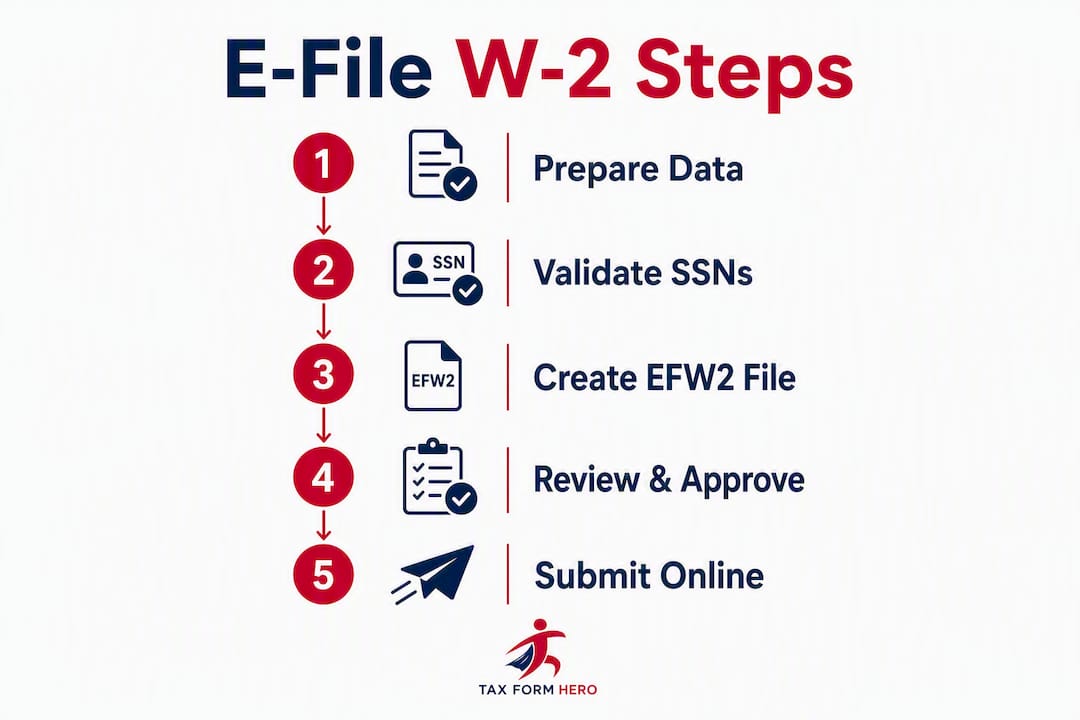
Follow this sequence to move from raw payroll data to a confirmed SSA submission:
- Verify Social Security Numbers — Cross-check each employee’s name and SSN against SSA records before building your file. Mismatches are the leading cause of rejects.
Pro Tip: Assign a named approver in your payroll process who reviews the final EFW2 file and signs off before submission. A second set of eyes on control totals and SSN counts catches errors that automated validation misses. Keep a record of who approved the submission and when.
If you would rather not do this on paper, e-file Form W-2 online with TaxFormHero instead.
Who must e-file, and what are the deadlines and penalties?
The 10-return threshold
The IRS mandates electronic filing for any employer who files 10 or more information returns in a calendar year. That count is not limited to W-2s. It includes Forms 1099-NEC, 1099-MISC, 1099-INT, 1098, and other listed information returns. Employers frequently undercount by tracking only W-2s, then discover they crossed the threshold once 1099s are added. That miscalculation can trigger mandatory e-file penalties.
2026 filing deadlines
- SSA transmittal (Copy A): — Also due January 31, 2026, whether filed on paper or electronically.
Waiver process (Form 8508)
Employers who cannot meet the e-file requirement due to undue hardship may request a waiver using Form 8508. The IRS requires submission of Form 8508 at least 45 days before the filing due date. Approval is not guaranteed, and the waiver covers only the specific filing period requested.
Penalties for non-compliance
Failing to e-file when required exposes employers to information-return penalties. Penalty amounts increase with the length of the delay, and intentional disregard carries the highest per-form rates. Filing on time, even if corrections are needed later, is always preferable to missing the deadline entirely.
Key rule: Count every information return your business files — W-2s, 1099s, 1098s — before concluding you are below the e-file threshold. The aggregate total is what the IRS measures.
How do you e-file using SSA Business Services Online (BSO)?
BSO is the SSA’s free employer portal for W-2 electronic filing. It offers two distinct tools, and choosing the right one depends on your volume.

Setting up a BSO account
Before filing, you need a BSO account:
- Go to the SSA’s Business Services Online portal and select “Register.”
W-2 Online vs. Wage File Upload
| Method | Best for | Volume limit | W-3 required? |
|---|---|---|---|
| W-2 Online | Manual entry, low volume | Up to a limited number of W-2s per session | No — SSA auto-generates |
| Wage File Upload | Bulk EFW2 files, high volume | No upper limit | No — SSA auto-generates |
BSO’s W-2 Online lets you key in up to 50 W-2s per submission directly in the browser. For more than 50 W-2s, the Wage File Upload tool accepts files formatted to the SSA’s EFW2 specification. In both cases, the SSA automatically creates the electronic equivalent of Form W-3 from your submitted records, so no separate transmittal form is needed.
Pro Tip: Before uploading a live EFW2 file, run it through Accuwage — the SSA’s free pre-submission testing tool. Accuwage validates record structure, field lengths, and control totals without touching your live submission. Catching errors there takes minutes; fixing a rejected live file can take days.
What are the EFW2 format rules and SSN verification requirements?
EFW2 file structure basics
The EFW2 format organizes wage data into fixed-length records. Each record type serves a specific purpose:
- RA record: Submitter information
- RE record: Employer information
- RW record: Employee wage data (one per W-2)
- RO record: Optional employee data (state/local wages)
- RS record: State wage record
- RT record: Total record (control totals for the employer)
- RU record: Total record (state totals)
- RF record: Final record (file trailer)
Control totals in the RT and RF records must match the sum of all RW records exactly. A mismatch is one of the most common automatic rejects. Validate these programmatically before upload.
Box 12 differences between methods
| Filing method | Box 12 codes supported |
|---|---|
| W-2 Online (manual) | Up to 4 box 12 entries per W-2 |
| Wage File Upload (EFW2) | Multiple box 12 codes consolidated in one wage record |
If an employee has more than four box 12 entries, the EFW2 upload path is the only BSO option that handles the full record without truncation.
Common formatting errors that cause rejects
- Incorrect record length (EFW2 uses fixed-width fields; extra or missing characters break the record)
- Missing or mismatched control totals in the RT/RF trailer records
- Invalid characters in name fields (special characters outside the allowed ASCII set)
- SSN/name mismatches against SSA records
SSN and TIN verification
Verifying SSNs before filing is the single most effective step for reducing rejects. The SSA offers a name/SSN verification service through BSO. Commercial platforms, including Tax Form Hero, offer TIN matching as an add-on that checks employee SSNs against IRS records before the file is submitted. Running verification in November or early December — before year-end payroll closes — gives time to resolve discrepancies without deadline pressure.

Pro Tip: Download the current EFW2 and EFW2C specifications directly from the SSA employer page each filing season. The SSA updates field definitions and code tables annually; using a prior year’s spec is a reliable way to generate rejects on the first submission.
How do you correct a W-2 after it has been filed?
Errors happen. The correction path depends on how the original W-2 was filed.
- Submit the W-2c/W-3c file — The SSA automatically generates the W-3c transmittal when you e-file W-2c records, just as it does for original filings.
Timing matters. If a reject on the original filing caused you to resubmit, the resubmission deadline is stated in the SSA’s rejection notice. Missing that window requires a separate correction filing rather than a simple resubmission.
What are the rules for delivering W-2 copies to employees electronically?
Employers may furnish W-2 copies to employees electronically, but only with the employee’s affirmative consent. Handing someone a PDF without documented consent does not satisfy the IRS furnishing requirement.
Required consent steps
- Notify employees that their W-2 will be provided electronically and describe the hardware/software needed to access it.
- Obtain affirmative consent electronically (an email reply or a checkbox in a self-service portal both qualify, provided the system captures the response).
- Inform employees of their right to withdraw consent at any time and the procedure for doing so.
- If an employee withdraws consent, revert to paper delivery for that employee’s current and future W-2s.
Timing
Electronic delivery must be completed by the same January 31 deadline that applies to paper copies. Posting the W-2 to an employee self-service portal satisfies the furnishing requirement on the date the employee can access it, not the date they actually download it.
Practical delivery tips
- Use PDF encryption or a secure portal with authenticated access; emailing an unencrypted W-2 PDF exposes sensitive data.
- Maintain an audit log showing when each employee’s W-2 was made available and when consent was recorded.
- For employees who did not consent or who withdrew consent, mail paper copies with sufficient lead time to meet the January 31 deadline.
Pro Tip: Collect electronic delivery consent during onboarding or open enrollment — not in January when employees are distracted and response rates drop. A consent collected in September is just as valid as one collected in January, and it removes deadline-week scramble.
When should you use a commercial e-file provider instead of SSA BSO?
SSA BSO is free and fully capable for straightforward filings. But it has real limitations that push many payroll teams toward commercial platforms.
Situations where commercial e-file is usually the better choice
- Volume above 50 W-2s with complex data: BSO Wage File Upload handles bulk EFW2 files, but building and validating those files manually is time-intensive. Commercial platforms accept CSV or Excel imports and convert them automatically.
- Multi-state employers: BSO handles federal filing only. State W-2 filings require separate submissions to each state agency. Commercial providers with integrated state filing handle both in one workflow.
- Accounting firms and payroll outsourcers: Managing dozens of client EINs through BSO means logging in and out repeatedly. Commercial platforms support multi-client dashboards and batch processing.
- TIN matching at scale: BSO offers SSN verification, but it is a separate manual step. Commercial platforms bundle TIN matching into the filing workflow.
- Audit trail requirements: Commercial platforms generate timestamped submission logs, ACK records, and access histories that satisfy internal audit and SOC requirements more easily than manual BSO records.
Trade-offs to consider
The primary cost of a commercial provider is the per-form fee. For a small employer filing 10–20 W-2s once a year, BSO’s free tools are entirely adequate. The economics shift when volume, multi-state obligations, or support SLA requirements enter the picture.
Pro Tip: Evaluate a commercial provider’s support availability in January, not October. Filing season support queues are where the difference between a responsive vendor and a slow one becomes concrete. Ask specifically about average response times during the last two weeks of January.
How Tax Form Hero simplifies W-2 e-filing
Tax Form Hero is an IRS-authorized e-file platform built for businesses and payroll professionals who need a reliable, cost-controlled filing workflow without a subscription commitment.
What the platform covers
- IRS authorization and SSA compliance: — Tax Form Hero is IRS-authorized and SOC 2 certified, meeting the security and compliance standards required for handling sensitive wage data.
- Automatic ACK handling: — The platform retrieves and stores SSA acknowledgement receipts on your behalf.
Who it fits
Tax Form Hero works well for small businesses filing intermittently, HR teams that need secure electronic delivery with documented consent, accounting firms managing multiple client EINs, and payroll providers who need bulk import and state filing in one place.
Getting started
- Create a free account at taxformhero.com (no payment required to set up).
- Import employee wage data using the bulk upload template or key records manually.
- Run the built-in validation check to catch SSN mismatches and formatting errors.
- Select any add-ons (state filing, TIN matching, e-delivery).
- Submit and download your ACK once the SSA confirms acceptance.
What causes W-2 e-file rejects and how do you fix them?
Most frequent reject causes
- SSN/name mismatch: — The name on the W-2 does not match the SSA’s record for that SSN. Usually caused by a legal name change, a data entry error, or an incorrect SSN on file.
Triage steps after a reject
- Open the ACK file and read the reject codes. Each code maps to a specific error type in the SSA’s documentation.
- Identify the affected record IDs (the SSA’s reject notice references specific record positions in your file).
- Validate SSNs for flagged employees using SSA’s BSO verification service or your platform’s TIN matching tool.
- Correct the EFW2 structural errors and rerun Accuwage before resubmitting.
- Resubmit within the deadline stated in the rejection notice.
When to escalate
Call the SSA Employer Reporting Service Center (1-800-772-6270) when the reject code is unclear, when a resubmission continues to fail after corrections, or when you need to confirm a submission deadline extension. Contact your commercial e-file vendor first for platform-specific errors; they can often resolve EFW2 formatting issues faster than working through SSA support directly.
Where can you get official help and download the EFW2 specifications?
| Resource | What it covers | Where to find it |
|---|---|---|
| SSA Business Services Online | BSO portal, W-2 Online, Wage File Upload | ssa.gov/employer |
| SSA Employer Reporting Service Center | Phone support for filing questions | 1-800-772-6270 (7 AM–7 PM ET, Mon–Fri) |
| EFW2/EFW2C Specifications | Technical format specs for wage file uploads | SSA Electronic W-2 Filing User Handbook |
| Accuwage testing tool | Pre-submission EFW2 file validation | Available through the SSA employer portal |
| IRS Topic 752 | W-2/W-3 filing requirements overview | irs.gov/taxtopics/tc752 |
| IRS General Instructions for W-2/W-3 | Deadlines, penalties, box-by-box instructions | irs.gov/instructions/iw2w3 |
When to contact SSA vs. IRS
Contact the SSA for questions about BSO access, EFW2 file rejects, ACK status, SSN verification, and W-2/W-2c submission procedures. Contact the IRS for questions about penalty assessments, waiver requests (Form 8508), box-level reporting rules, and employee copy furnishing requirements.
When calling either agency, have your EIN, the submission ID from your ACK or reject notice, and the specific error codes ready. That information cuts call time significantly.
Key Takeaways
Employers who e-file W-2 forms through SSA BSO or an IRS-authorized commercial platform meet the January 31 deadline, receive ACK receipts as compliance evidence, and avoid the per-form penalties that come with late or paper-only filings above the 10-return threshold.
| Point | Details |
|---|---|
| E-file threshold | Any employer filing 10 or more information returns must e-file; count W-2s, 1099s, and 1098s together. |
| January 31 deadline | Both employee copies and the SSA transmittal are due January 31; the same date applies to electronic and paper filings. |
| Validate before submitting | Run EFW2 files through Accuwage and verify SSNs before live upload to prevent rejects and penalty exposure. |
| Corrections follow the original | If the original W-2 was e-filed, the W-2c correction must also be e-filed; paper originals require paper corrections. |
| Tax Form Hero | IRS-authorized, SOC 2 certified, per-form pricing from $1.99 with bulk import, state filing, TIN matching, and encrypted e-delivery. |
The part most payroll guides skip
The official instructions for W-2 electronic filing are thorough. What they do not tell you is where the real operational risk lives, and it is almost never the filing itself.
The highest-risk moment in the W-2 cycle is the six weeks before the January 31 deadline, when payroll teams are simultaneously closing the year, processing final adjustments, and trying to validate employee data. SSN mismatches that could have been caught in October get discovered on January 28. EFW2 files built from payroll exports that were never tested against Accuwage fail on first submission. The deadline does not move.
The employers who file cleanly, year after year, share one habit: they treat W-2 preparation as a November project, not a January one. SSN verification runs in November. Payroll data locks in mid-December. The EFW2 test file goes through Accuwage before Christmas. By January 31, the submission is a formality.
The second thing most guides understate is the employee consent documentation requirement for electronic delivery. Many employers collect consent informally, or assume that because an employee uses a self-service portal, consent is implied. It is not. The IRS requires affirmative, documented consent. An audit that surfaces missing consent records can turn a clean filing into a compliance problem after the fact.
Commercial e-file platforms earn their per-form cost not just through automation, but through the audit trail they generate automatically. Timestamped ACKs, consent logs, and submission histories are worth more than the filing fee when a penalty notice arrives two years later.
File W-2s faster with Tax Form Hero
Per-form filing with no subscription, no setup fee, and no minimum volume. Tax Form Hero is IRS-authorized and SOC 2 certified, which means your wage data is handled to the same security standard that enterprise payroll systems require, at a price point that works for a 10-person business and a 10,000-person firm alike.
Bulk import from CSV or Excel, built-in SSN validation, automatic ACK retrieval, state filing for 35+ states, and encrypted employee e-delivery are all available as part of a single per-form workflow. There is no contract to sign and no annual fee to justify. You pay $1.99 per form and add only the services you need.
Start filing W-2s at Tax Form Hero — create a free account, import your employee data, and submit your first W-2 in one session.
This article provides general information about W-2 electronic filing requirements. It is not legal or tax advice. Confirm current rules and deadlines with the IRS, SSA, or a qualified tax professional before filing.
Authoritative sources and further reading
The following official sources were used throughout this article and are recommended for compliance checks, technical format downloads, and direct contact with the SSA and IRS:
- SSA Business Services Online (BSO) — Employer Portal: Access W-2 Online, Wage File Upload, SSN verification, and ACK status.
- Electronic W-2 Filing User Handbook (SSA): Full technical reference for BSO registration, EFW2 file submission, and W-2c corrections.
- SSA Employer W-2 Filing Instructions — First Time Filers: Step-by-step BSO enrollment and filing guidance for new filers.
- SSA FAQ: How do I file W-2s, W-2Cs, and W-3s?: Answers to common BSO filing questions, including reject causes and correction procedures.
- IRS Topic No. 752 — Filing Forms W-2 and W-3: IRS overview of W-2/W-3 filing requirements, deadlines, and the automatic W-3 rule for e-filers.
- IRS General Instructions for Forms W-2 and W-3 (2026): Authoritative box-by-box instructions, penalty schedules, waiver procedures, and e-file thresholds.
- IRS Electronic Filers FAQ: Clarifies which information returns count toward the 10-return e-file threshold.
Recommended

File Information Returns With Confidence
TaxFormHero supports 20+ IRS information returns, including 1099 and W-2 forms, with bulk Excel import, name/TIN matching and encrypted recipient delivery.
Explore TaxFormHero