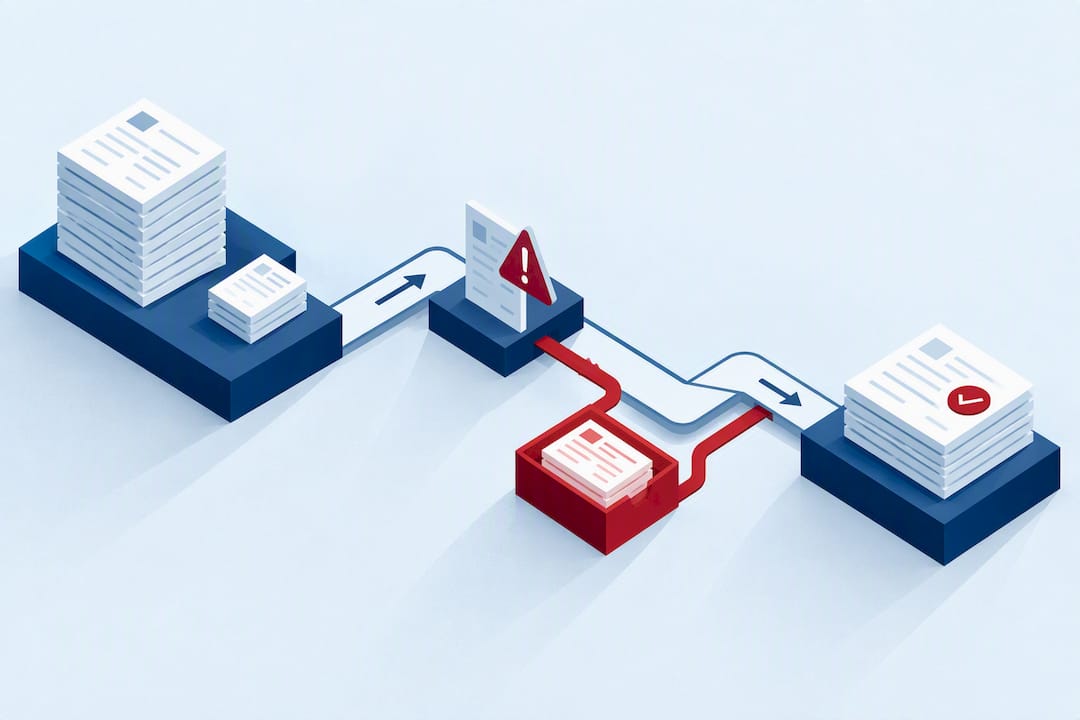
A compliant W-2 filing workflow closes payroll, validates employee and wage data, transmits Copy A to the SSA, furnishes employee copies, verifies acceptance, and keeps proof, all by the SSA due date. For tax year 2026, the due date for both filing and furnishing generally falls in early February 2027, typically February 1, unless that date falls on a weekend or holiday, in which case it shifts to the next business day. Employers who file 10 or more combined information returns in a calendar year generally must e-file, and every step needs a paper trail wide enough to survive an audit.
TL;DR:
- Employers filing 10 or more combined information returns in a year must e-file, including W-2s and all other return types, not just W-2s alone.
- Building a W-2 workflow requires six checkpoints, with each step only advancing after the previous one is validated and complete, to avoid downstream errors.
- The February 1, 2027, deadline shifts if it falls on a weekend or holiday, but extensions are limited and do not move the employee furnish date.
- Validation tools like SSA’s AccuWage should be run before transmission to catch formatting errors early, reducing reject rates and last-minute fixes.
- Recording proof of employee delivery and maintaining separate files for initial submissions and corrections are crucial for audit preparedness.
Building a Step-by-Step W-2 Filing Workflow
A W-2 filing workflow runs on six checkpoints, not one big submission event. Treat each as a gate: you don’t move to the next step until the current one is clean.
- Close payroll and freeze source data. Lock down final wages, withholdings, and benefit adjustments for the year, then reconcile totals against your quarterly Forms 941. Any mismatch here compounds downstream.
- Run preflight validations. Check names against Social Security cards, verify SSNs and your EIN, confirm Box 12 codes match the correct letter designations, and check state and local wage lines against your payroll register.
- Generate employee copies and SSA Copy A. Format Copy A correctly for your submission method. The SSA’s Business Services Online (BSO) supports online entry for up to 50 W-2s per report, with file upload required for larger batches.
- Transmit Copy A and Form W-3. Submit through BSO and capture your WFID confirmation receipt immediately. That receipt is your proof of timely filing if the SSA later disputes a date.
- Monitor acceptance status. “Submitted” is not the same as “accepted.” Log into BSO, check for rejects, and resubmit corrected files within the window BSO allows. Separately, document proof that employee copies were actually furnished, mailed, handed out, or delivered electronically with consent on file.
- Retain records and link corrections. Store the original filing alongside any later Form W-2c or Form W-3c, so an auditor can trace the full history of a single employee’s wage record in one place.
Pro Tip: Run your file through the SSA’s AccuWage validation tool before you transmit anything. It catches formatting errors that would otherwise come back as a reject days later, when you have less time to fix them.
TaxFormHero is an IRS-authorized e-filing platform, so you can e-file Form W-2 online without paper or a subscription.
When Are W-2 Filing Deadlines and Extensions Available?
The IRS General Instructions for Forms W-2 and W-3 set February 1, 2027, as the deadline for both furnishing W-2s to employees and filing Copy A with the SSA for tax year 2026. When that date lands on a weekend or federal holiday, the deadline shifts to the next business day, but don’t count on that cushion when you’re building your internal schedule.
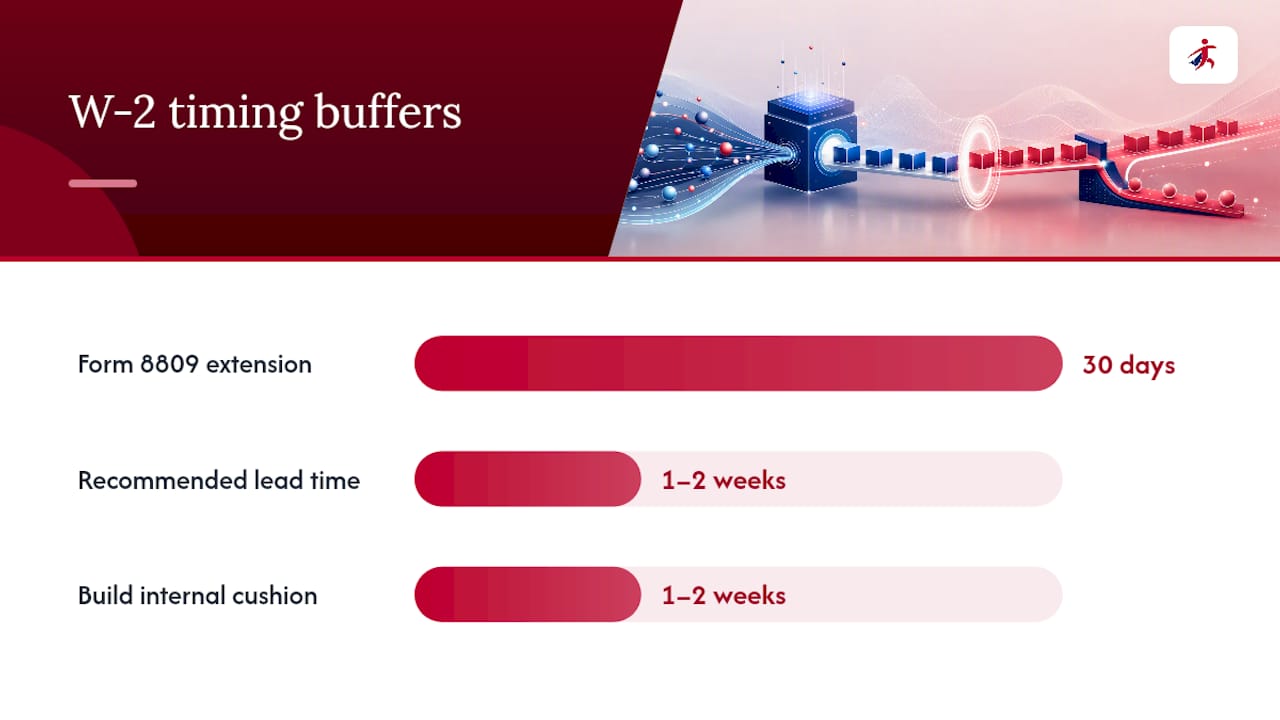
Form 8809 may authorize a single 30-day extension to file under limited extraordinary circumstances, extending the filing deadline but not the deadline to furnish forms to employees. It does not move the employee-furnish deadline.
- Submission date (when you transmit) and acceptance date (when the SSA confirms your file processed clean) are two different events.
- Employee-furnish date is a third, separate obligation that must be documented independently.
- Build your internal target date at least one to two weeks ahead of February 1 to leave room for a reject-and-resubmit cycle.
Penalty exposure scales with lateness. The IRS penalty schedule applies escalating amounts depending on how late a correct return is filed, with the steepest penalties reserved for intentional disregard of the filing requirement. Filing and furnishing are penalized separately, so a late Copy A submission and a late employee copy can each trigger their own penalty.
Who Must E-File, and What Is the 10-Return Rule?
Employers filing 10 or more combined information returns in a calendar year must e-file, according to the IRS’s electronic filing rules. That threshold counts across return types, not just W-2s.
- A business with 4 W-2s and 8 Forms 1099-NEC hits 12 combined returns and must e-file everything, even though neither category alone reaches 10.
- BSO online entry limits are around 50 W-2s per report and 25 W-2c corrections per report; larger batches should use formatted file uploads.
- Other information returns route through the IRS’s FIRE system or its newer Transmitter Control Code (TCC) infrastructure, which operates separately from SSA’s BSO.
- If e-filing creates a genuine hardship, Form 8508 requests a waiver, but it must be filed at least 45 days before the W-2 due date to have any chance of approval before the deadline arrives.
The practical trap is the mixed-return employer: a small headcount with only a handful of W-2s, paired with dozens of 1099 contractors. That combination crosses the 10-return line quickly, and teams that only track their W-2 count miss it. Inventory every return type your business files before deciding whether paper filing is even an option this year.
What Consent Do You Need for Electronic W-2 Delivery?
Furnishing a W-2 electronically requires affirmative consent from the employee, not a default opt-in buried in an onboarding packet. The IRS’s consent and disclosure rules spell out exactly what employees must be told before they agree.
- The hardware and software needed to access and print the electronic W-2.
- The scope and duration of the consent, meaning whether it covers one tax year or continues until revoked.
- The procedure for withdrawing consent at any time, and what happens after withdrawal.
- The paper fallback: employees who don’t consent, or who withdraw consent, must still receive a paper copy by the furnish deadline.
A change in the employee’s access method, say, a new payroll portal that requires different software, can require you to collect fresh consent rather than relying on the original agreement. For employees who never consented, default to paper and log the delivery date. If you later issue a Form W-2c correcting a W-2 that was originally furnished electronically, the corrected copy generally needs to reach the employee through a method they consented to receive, or in paper form if they didn’t.
Pro Tip: Keep consent records in the same system where you store the original W-2 filing. When an auditor asks how an employee received their W-2, you want that answer in seconds, not a scavenger hunt through old emails.
Fixing Common W-2 Mistakes with Form W-2c and W-3c
Most rejects trace back to a small handful of causes, and knowing them in advance cuts your resubmission cycles roughly in half.
- Name and SSN mismatches top the list. A legal name change that wasn’t updated with the Social Security Administration, or a simple typo in a nine-digit SSN, will bounce a file every time.
- EIN errors happen when a business uses a DBA name or a prior EIN after a restructuring.
- Layout and format problems show up in EFW2 file uploads when field lengths or record types don’t match SSA specifications.
- Incorrect Box 12 or Box 13 entries slip through when a payroll system defaults to the wrong code letter for retirement plan contributions or third-party sick pay.
BSO error reports distinguish between “received” and “accepted.” A file can be received without being accepted if it fails validation checks, and treating a received file as done is one of the most common compliance gaps payroll teams create for themselves.
When you find an error after filing, correct it with Form W-2c, paired with Form W-3c if you’re correcting the transmittal totals. If the error also affected payroll tax deposits, for example, wages were understated and Social Security tax was underpaid, you likely also need Form 941-X to correct the quarterly return. Store every W-2c next to its original W-2 and note which payroll adjustment, if any, triggered the correction.
Preflight Checks and Year-End Controls Before You Submit
A short checklist run before every submission catches most problems before the SSA does.
- Freeze payroll source data for the year and reconcile totals to your quarterly Form 941 filings.
- Run TIN and SSN validation against every employee record, and route mismatches into a dedicated exception queue rather than letting one bad record block the entire batch.
- For paper filers, inspect printed Copy A for alignment and legibility issues that scanning equipment will reject.
- For EFW2 file uploads, verify record layout, field lengths, and file structure against SSA specifications before transmitting.
- Confirm you can produce proof of employee delivery, mail date, e-delivery consent log, or hand-delivery acknowledgment, for every W-2 issued.
| Control | What it catches | Typical owner |
|---|---|---|
| TIN/SSN validation | Name and SSN mismatches | Payroll admin |
| 941 reconciliation | Wage and withholding discrepancies | Accounting |
| EFW2 format check | File upload rejects | Payroll system admin |
| Consent log review | Missing e-delivery authorization | HR/payroll compliance |
Retention practices matter as much as the checks themselves. Keep W-2 filings, related W-2c corrections, and proof of employee furnishing for at least four years, since that’s the window the IRS typically references for employment tax record audits.
An Example: Running This Workflow on TaxFormHero
TaxFormHero maps directly onto each checkpoint in the workflow above, without changing the underlying rules you have to follow. You enter recipients by hand or bulk-import a full employee roster from an Excel template, which handles Step 1 and Step 3 for teams with more than a handful of W-2s. TIN Check runs a per-record verification pass before you transmit, reducing the SSN mismatches that cause most BSO rejects. State filing and encrypted e-delivery are available as add-ons, so a single pass through the platform can cover federal transmission, state copies, and employee delivery together.
As an IRS-authorized e-filer with a SOC 2 Type I attestation, TaxFormHero transmits federal returns to the IRS over the IRIS A2A system and prices per form with no subscription. Recipients can also download their own printable PDF copies, which gives employees a fallback if a mailed or emailed copy goes missing.
A practical starting checklist looks like this:
- Prepare your employee data file using the provided Excel template.
- Bulk import and let the platform flag obvious formatting issues.
- Run TIN Check before transmission, not after.
- Submit through the platform’s SSA transmission path and save the confirmation.
- Monitor status and resolve any flagged records promptly.
- Confirm e-delivery consent or trigger print-and-mail for employees who haven’t consented.
Pro Tip: TaxFormHero handles the transmission and delivery mechanics, but consent collection, final data accuracy, and long-term record retention remain the employer’s responsibility. No platform removes that obligation.
Author’s Practical View: Priorities for Payroll Teams This Filing Season
Most late-January panic isn’t caused by the deadline. It’s caused by teams that transmit for the first time on January 30 and have no room left to fix a reject. Build in a real acceptance buffer, not just a submission buffer.
Automation earns its keep on bulk validation, but every workflow still needs a human-reviewed exception queue for the handful of records that don’t fit the pattern. Treat your SSA filing proof and your employee-furnishing proof as two separate files worth keeping, because they answer two different audit questions.
— Nazrul
How TaxFormHero Supports the W-2 Filing Workflow
If your team is still stitching together spreadsheets, mail merges, and a separate BSO login to get through this workflow, TaxFormHero collapses that into one pass. There’s no subscription and no signup fee. You pay per form, starting at $2.99 for W-2 e-filing for the first 50 forms, with rates stepping down as volume increases.

TaxFormHero handles bulk import, TIN Check, federal transmission over IRIS A2A, state filing, and encrypted e-delivery or print-and-mail as add-ons. What it doesn’t do, and shouldn’t, is replace your judgment on data accuracy or your obligation to collect valid electronic-delivery consent. Those stay with your team. Everything else, from formatting Copy A correctly to giving employees a printable recipient copy, runs through the platform. Check current per-form pricing and start your W-2 batch before your internal deadline, not the IRS’s.
Sources
Verify every rule in this workflow directly against primary sources before you rely on it for a live filing.
- General Instructions for Forms W-2 and W-3 (2026) | Internal Revenue Service
- Business Services Online (BSO) EFW2 & EFW2C | Social Security Administration
FAQ
What Are the Instructions for Filing Form W-2?
The General Instructions for Forms W-2 and W-3 require employers to complete Copy A with accurate wage, tax, and identification data, transmit it to the SSA, and furnish matching copies to employees. Both actions are due by February 1, 2027, for tax year 2026, with e-filing required if you have 10 or more combined information returns.
What Is the $600 Rule?
The $600 threshold applies to Form 1099-NEC for nonemployee compensation, not to W-2 wages. W-2s must be issued to any employee who had income, Social Security, or Medicare tax withheld, regardless of a separate dollar threshold like the 1099 rule.
What Are Common W-2 Mistakes to Avoid?
The most frequent errors are name and SSN mismatches, incorrect EINs, formatting problems in uploaded files, and wrong Box 12 or Box 13 codes. Running TIN validation and an AccuWage-style pre-upload check before transmission catches most of these before they become rejects.
What Changes for Filing Form W-2 in 2026?
For the 2026 filing season, the core deadline stays fixed: file and furnish by February 1, 2027, for tax year 2026 wages. The main shift for many employers is the continued expansion of mandatory e-filing under the 10-return aggregate threshold, which pulls smaller filers who previously mailed paper forms into electronic filing.
How Much Does It Cost to E-File a W-2?
Pricing varies by platform, but TaxFormHero charges per form with W-2 e-filing starting at $2.99 for the first 50 forms, with no subscription or signup fee. Add-ons like state filing, e-delivery, and TIN Check are priced separately and listed on the pricing page.
Recommended
- February 1, 2027: W-2 Deadlines and Efile Checks for Payroll Teams
- Tax Form Hero - E-File W-2 Forms: 2026 Guide for Payroll Professionals
- W-2 E-Filing for Paychex Payroll Data: 2027 Guide

File Information Returns With Confidence
TaxFormHero supports 20+ IRS information returns, including 1099 and W-2 forms, with bulk Excel import, name/TIN matching and encrypted recipient delivery.
Explore TaxFormHero