
If your 1099 e-file was rejected, the fix is almost always mechanical: pull the exact rejection code, correct the specific field it points to, and resubmit electronically rather than by paper. Most rejections trace back to a data mismatch or a formatting error, not a system failure, which means the majority are fixable within a single business day if you know where to look.
Start here, in order:
- Capture the rejection code and message exactly as issued by FIRE or IRIS before you touch anything else.
- Stop resubmitting the same file. Duplicate transmissions create a second problem on top of the original one.
- Run TIN Matching on the affected payee records to confirm whether the name/TIN combination is the source of the error.
- Decide whether you need a corrected return or a void and refile, since the two paths produce different outcomes with the IRS.
- Escalate to your e-file provider or the IRS if the rejection points to a transmitter credential problem rather than a data field.
Pro Tip: Screenshot or save the acknowledgment file the moment you receive it. If a rejection dispute ever comes up during penalty review, that timestamped record is your best evidence that you acted promptly.
Key Takeaways
Resolving a 1099 e-file rejection requires identifying the exact IRS error code, correcting the specific data field it flags, and refiling electronically through the correct system.
| Point | Details |
|---|---|
| Capture the code first | Record the exact rejection code and message before making any changes to your file. |
| TIN mismatches lead | Name/TIN combination errors are the most common rejection cause; run TIN Matching immediately. |
| Correction path matters | Choose void-and-refile versus corrected return carefully, and never check VOID on paper corrections. |
| E-file corrections too | If the original was e-filed, the correction must be e-filed as well, with no paper exception. |
| Prevent with upstream tools | TaxFormHero’s TIN verification and Pub.1220 validation catch mismatches and schema errors before submission. |
Filing one yourself? You can e-file Form W-2 online with TaxFormHero, an IRS-authorized e-filing platform.
Common Causes of a 1099 E-File Rejection
Most 1099 e-file issues fall into five categories, and knowing which one you’re dealing with cuts your troubleshooting time dramatically.
-
Name/TIN mismatches. This is the single most common rejection reason, according to the IRS’s own filing instructions, and it usually happens because the payee’s legal name on file with the Social Security Administration or IRS doesn’t match what you entered. A DBA instead of a legal name, an EIN entered where an SSN belongs, or a stray comma in a business name can all trigger this error.
-
Missing or invalid data fields. Address lines split incorrectly, a two-letter state code left blank or misspelled, or a required box populated with special characters instead of numbers will all bounce a file. IRIS and FIRE both validate field structure before content, so a formatting slip can reject a return even when the underlying data is correct.
-
Amount and box errors. Decimals entered as whole numbers, negative values in boxes that only accept positive figures, or income reported in the wrong box for the payment type (nonemployee compensation coded as rents, for example) are frequent culprits, especially in manually built files.
-
Transmission and transmitter problems. An invalid EFIN, a Transmitter Control Code that doesn’t match the filing system you’re using, or a malformed file header will reject the entire batch before the IRS even reads individual records. Note that a FIRE TCC and an IRIS TCC are not interchangeable.
-
Duplicate and inconsistent batches. Resubmitting a file that already processed, or submitting a correction batch whose summary totals don’t reconcile with the original transmission, generates rejections that look like data errors but are really batch-control problems.
Pro Tip: Build a simple pre-submission log that tracks batch ID, record count, and submission timestamp for every file you send. When something bounces, you’ll know in seconds whether it’s new data or a duplicate.
How to Read IRS Rejection Codes and What They Mean
Rejection codes aren’t random. They cluster into a handful of families, and once you recognize the pattern, decoding a new code takes seconds instead of a support ticket.
Codes in the F1099-502 series almost always point to name/TIN combination errors. Codes beginning with 029 typically flag transmitter or EFIN validation problems rather than anything wrong with the return itself. Content and format codes, often in the 1000 range, usually mean the file violates a schema rule defined in Publication 1220.
A few high-frequency examples and their fixes:
- F1099-502-02: Name/TIN combination doesn’t match IRS records. Run TIN Matching, correct the field, and refile the corrected record.
- F1099-029-01: Transmitter credential issue. Verify your EFIN and TCC are active and correctly paired with the filing system.
- F1099-003: Missing required field. Check the record layout against Pub.1220 for that form type.
- F1099-020: Invalid state code. Confirm the two-letter abbreviation matches USPS standards.
- F1099-045: Amount field formatting error. Check for stray characters, missing decimals, or negative values in a positive-only box.
The IRS maintains a detailed error code matrix that lists every schema and rejection code along with its precise cause. Keep this open alongside your filing software whenever a batch comes back rejected. Most reputable e-file platforms will also translate the raw code into human language, but cross-checking against the official matrix is the only way to be certain you’re fixing the actual problem rather than guessing.
How Do You Correct and Resubmit a Rejected 1099?
The correction workflow depends on one decision: is this a full void-and-refile, or a corrected return? Get that choice wrong and you can create a second filing problem on top of the first.
-
Document the rejection details first. Save the rejection file, note the specific record number flagged, and log your Transmitter Control Code and batch ID alongside the rejection message. This record matters later if you need to demonstrate reasonable cause for a penalty waiver.
-
Determine whether you need a corrected return or a void. A rejected file was never accepted by the IRS, so in most cases you’re simply fixing the data and refiling, not filing a “correction” in the formal sense. True corrections apply to returns the IRS already accepted where you later discover an error.
-
Watch the VOID-box pitfall on paper corrections. Checking VOID on a paper corrected form can cause IRS scanning systems to skip the correction entirely. Use the CORRECTED checkbox instead, and prefer e-filing corrections whenever the original return was e-filed, since the e-file requirement carries over to corrections.
-
Follow the formatting specs exactly. Electronic corrections must conform to Pub.1220’s FIRE specifications or the IRIS A2A requirements in Pub.5717 and Pub.5718. If your software allows a small test batch, run one before resubmitting the full file.
-
Resubmit through the correct channel and verify acceptance. FIRE and IRIS produce distinct acknowledgment files. Confirm you received an “Accepted” status, not just a submission confirmation, and save that acknowledgment.
Keep your W-9 collection records and TIN Matching results filed alongside each payee’s history. If a penalty notice arrives later, that documentation is often what separates a quick reasonable-cause waiver from a drawn-out dispute.
Pro Tip: If you e-filed the original 1099 and later find an error, e-file the correction too. The IRS does not let you drop back to paper just because the fix is small.
What Prevents 1099 E-File Rejections Before They Happen?
The controls that stop rejections cost less time in October than the fixes cost in February.
Running IRS TIN Matching in bulk, well before your filing deadline, is the highest-value single control available. It catches name/TIN mismatches while you still have time to contact the payee, rather than after the IRS has already bounced the return. Reconcile every no-match result against your W-9 file before you file anything.

Speaking of which, a formal W-9 collection process matters more than most filers admit. Keep signed forms indexed against each payee record, set a firm escalation timeline for nonresponders, and never rely on a payee’s memory of their own legal name or entity type.
Before submission, validate your file against the Pub.1220 or A2A specification your platform uses. Schema validators catch header and field-structure errors that are invisible until the IRS rejects the whole batch.
A few operational habits round this out:
- Version-control your source spreadsheets so a stale export never gets resubmitted by accident.
- Build deduplication checks into your export process to catch repeat batches before transmission.
- Train staff on the recurring pitfalls: legal name versus DBA, correct box selection for payment type, and state code formatting.
- Add an automated pre-submit check as a standing step in your workflow, not an occasional audit.
Pro Tip: Treat TIN Matching as a September task, not a January one. The IRS TIN Matching program supports bulk lookups, and running it early gives you months, not days, to chase down a corrected W-9.
When Should You Contact the IRS About a Filing Problem?
Penalties for incorrect or late information returns scale with how quickly you correct them, and the e-file requirement applies to corrections just as it applies to originals. If you e-filed the original 1099, you must e-file the correction too. There’s no paper shortcut once you’ve crossed that line.
- If you can’t meet the e-file deadline for a legitimate reason, request a waiver using Form 8508, submitted at least 45 days before the due date.
- Call the IRS Information Returns customer service line at 866-455-7438 when a rejection points to a systemic or transmitter-level issue you can’t resolve through your software provider.
- Have your TCC, EFIN, rejection code, and a copy of the acknowledgment file ready before you call. Support moves faster when you’re not searching for documentation mid-conversation.
- Penalty tiers increase the longer a correction is delayed, so treat any unresolved rejection as time-sensitive rather than something to batch with next quarter’s cleanup.
How TaxFormHero Helps You Avoid and Fix Rejections
TaxFormHero is built around the exact failure points covered above. The platform is IRS-authorized and SOC 2 ready, which matters if your organization needs a documented compliance trail alongside the filing itself.
- Built-in TIN verification catches name/TIN mismatches, the leading rejection cause, before the file ever reaches the IRS.
- File validation against Pub.1220 schema rules reduces the formatting and header errors that cause transmission-level rejections.
- Bulk import lets you process high volumes without manually re-keying data, which cuts the transcription errors that show up as amount or box mismatches.
- State filing add-ons for 35+ states address a category of errors that purely federal-focused tools often miss.
- Print and mail plus encrypted e-delivery round out the workflow for teams that need recipient copies handled without a separate vendor.
Pricing runs pay-per-form with no sign-up fees or subscriptions, with rates that decrease at volume, so smaller filers aren’t paying enterprise rates for a handful of forms.
Editorial Take: Rejections Are a Process Failure, Not a Filing Failure
The conventional advice on 1099 rejections treats every code as a one-off puzzle to solve in isolation. That framing misses the point. Almost every rejection traces back to the same handful of process gaps: no bulk TIN Matching before filing season, no single source of truth for payee names, and no clear internal rule distinguishing a correction from a void-and-refile.
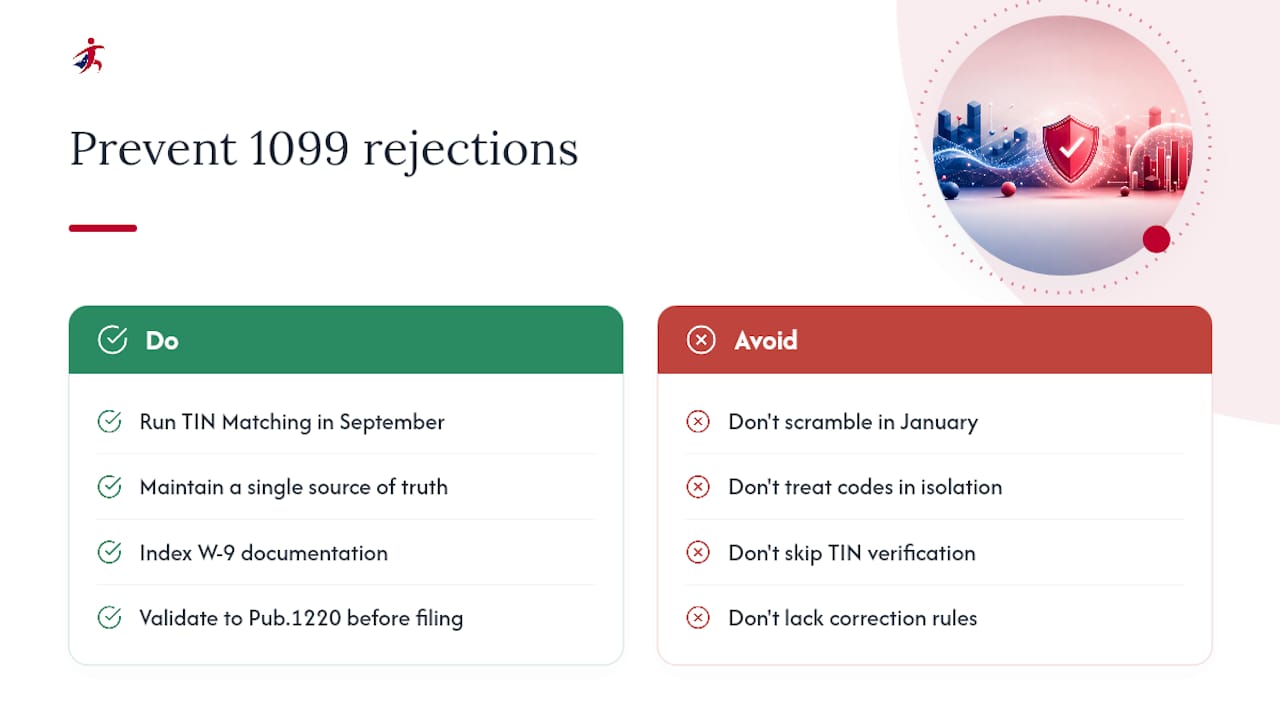
What gets overrated is the idea that reading the error code matrix carefully is the hard part. It isn’t. The matrix is public and well organized. The hard part is building the habit of running TIN Matching in September instead of scrambling in January, and keeping W-9 documentation indexed well enough that a reasonable-cause argument writes itself if a penalty notice shows up.
If you take one thing from this, prioritize the upstream fix over the downstream scramble. A platform that validates against Pub.1220 and verifies TINs before submission prevents most of the rejections this article walks through. Fixing rejections after the fact is a skill worth having. Not needing that skill is the better outcome.
— Nazrul
Get Your 1099s Filed Without the Rejection Cycle
Chasing rejection codes, re-keying corrected data, and waiting on transmitter support eats time you don’t have during filing season. TaxFormHero is built to stop that cycle before it starts, running TIN verification and Pub.1220 validation on your files before they ever reach the IRS, so the errors this article covers get caught at upload instead of after rejection.

There’s no subscription to commit to and no sign-up fee to test it out. You pay per form, starting at $1.99 and dropping to $0.45 at volume, whether you’re filing five 1099s or five thousand. If your team handles multiple states, the platform’s direct state filing covers 35+ states, and encrypted e-delivery plus print and mail options mean recipient copies are handled without a second vendor. Head to TaxFormHero to upload your file and see your validation results before you submit to the IRS.
Where to Verify These Rules Yourself
- Publication 1220 covers FIRE file format and electronic transmission specifications.
- Publication 1099 explains who must e-file, waiver procedures, and penalty guidance.
- The IRS error code matrix decodes specific rejection codes and their remedies.
- TIN Matching guidance explains interactive and bulk matching workflows.
Sources
- Publication 1220 (FIRE electronic submission specifications)
- Publication 1099 (General Instructions for Certain Information Returns)
- IRS error code matrix (FIRE/IRIS)
- Taxpayer identification number (TIN) matching — IRS
Recommended

File Information Returns With Confidence
TaxFormHero supports 20+ IRS information returns, including 1099 and W-2 forms, with bulk Excel import, name/TIN matching and encrypted recipient delivery.
Explore TaxFormHero