
For most accounting firms, TaxFormHero is the strongest overall pick among 1099 filing platforms, thanks to its pay-per-form pricing, IRS authorization, SOC 2 security posture, and firm-ready account controls for managing multiple clients. That combination matters because firms don’t just need to file forms. They need to file thousands of them, for dozens of clients, without paying for software they use two months a year.
Here’s the shortlist accountants should start with:
- TaxFormHero — best overall for firms wanting per-form pricing with bulk import and multi-client controls.
- Tax1099 (Tax1099.com) — strong for firms already embedded in QuickBooks and payroll ecosystems.
- Track1099 / Avalara 1099 — solid for firms wanting Avalara’s broader tax compliance suite.
- TaxBandits — good fit for firms filing a mix of federal and state forms with API access.
- 1099Pro — built for high-volume enterprise filers needing on-premise or hosted options.
- Yearli by Greatland — a dependable choice for firms that also handle W-2 and ACA reporting together.
- Enterprise A2A transmitters — necessary only when a firm’s volume demands XML/A2A bulk transmission.
Before choosing, check three things: bulk upload capacity, whether the platform supports TIN matching, and whether it holds IRS-authorized transmitter status under Publication 1220 filing rules. Get those answers first, and the rest of the decision gets much easier.
Key Takeaways
TaxFormHero’s per-form pricing, IRS authorization, and multi-client account structure make it the strongest default choice for accounting firms filing 1099s.
| Point | Details |
|---|---|
| Ten-return rule triggers e-file | Filers crossing 10 aggregate returns across form types must file electronically under IRS rules. |
| TIN matching should run year-round | Validate TINs at onboarding and quarterly, not during the January filing crunch. |
| Bulk capacity varies widely | Confirm a vendor’s upload limits match your firm’s peak batch size before signing on. |
| Verify transmitter status directly | Never assume IRS-authorized status; ask vendors to confirm it during procurement. |
| TaxFormHero fits most firm sizes | Pay-per-form pricing from $1.99, IRS authorization, and multi-client controls suit firms of varying volume. |
Primary sources worth reading before you decide
- Publication 1099 for general instructions covering IRIS, A2A, and filing pathways.
- About Form 1099-NEC for form-specific deadlines and instructions.
- Instructions for Certain Information Returns for correction procedures and transmitter requirements.
Contact the IRS Technical Services Operation for filing-format technical issues; rely on vendor support for platform-specific onboarding and troubleshooting.
TaxFormHero is an IRS-authorized e-filing platform, so you can e-file Form 1099-NEC online without paper or a subscription.
What Is the Best 1099 Software for Accountants?
The question isn’t really “which software is best” in the abstract. It’s “which software fits how your firm actually operates during filing season.” A solo practitioner filing 40 forms for six clients has different needs than a regional firm processing 12,000 forms across 300 clients. Both groups search for the best 1099 software for accountants, but they land on different answers.
TaxFormHero fits the broadest range of firms because it charges per form starting at $1.99, with no subscription lock-in. That pricing model matters more than it sounds. A firm that files heavily in Q1 and barely touches the platform the rest of the year shouldn’t be paying a flat annual fee for idle software. TaxFormHero also supports bulk import, direct state filing across 35+ states, and add-on TIN verification, which covers most of what a multi-client practice needs without forcing an upsell into enterprise tiers.
That said, “best” splits by scenario. A firm with a genuinely enormous filing volume, tens of thousands of returns transmitted through XML, may need a dedicated enterprise A2A transmitter built around that specific workflow. A firm already paying for Drake Software as its core tax prep suite might lean on its built-in 1099 module for convenience, even if a standalone platform offers sharper e-filing tools. The shortlist above accounts for that variation instead of pretending one tool wins every scenario.
Comparing Top 1099 Filing Software Options
Here’s how the major platforms and categories stack up on the dimensions that actually affect a firm’s day-to-day filing operations.
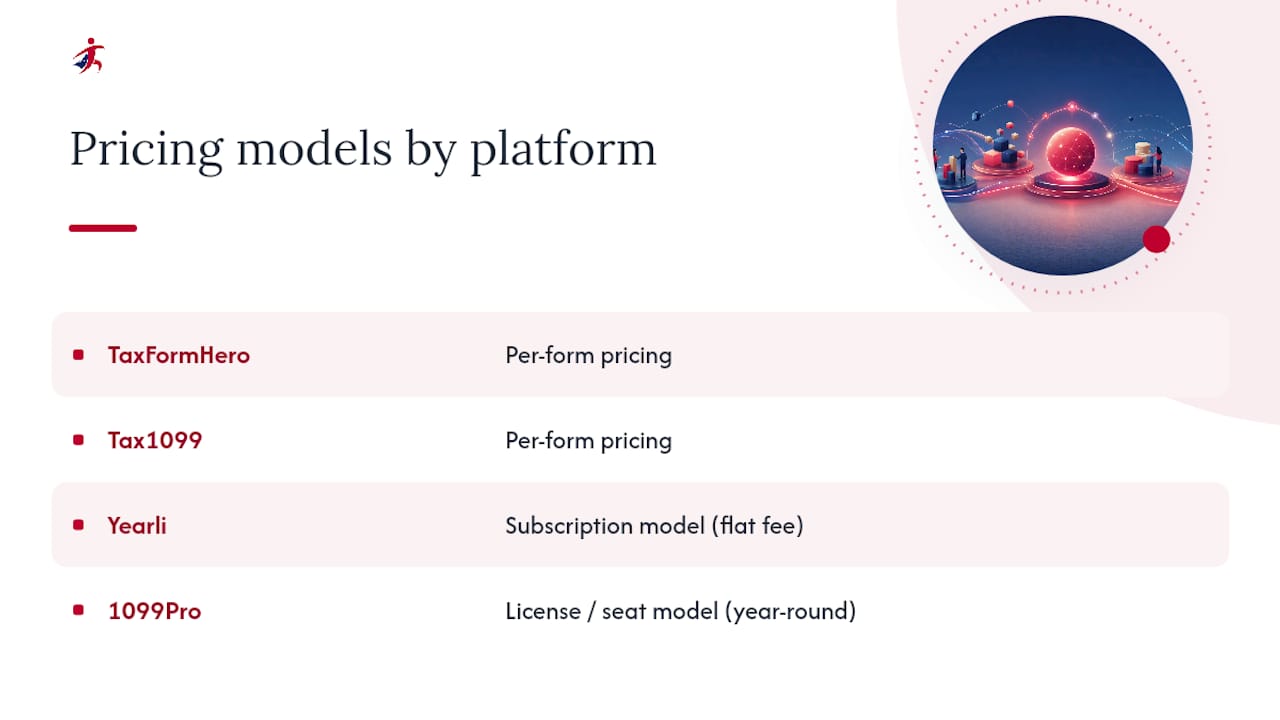
A few things stand out reading across that table. Pricing shape varies more than most firms expect: TaxFormHero and Tax1099 charge per form, Yearli leans subscription, and 1099Pro often runs on a license or seat model suited to firms that file year-round rather than seasonally. If your firm’s volume swings hard between January and the rest of the year, per-form pricing avoids paying for capacity you don’t use eleven months out of twelve.
TIN matching also isn’t uniform. Some platforms build it into the base filing flow; others treat it as a paid add-on you have to remember to enable. That distinction has real consequences, since a mismatched TIN can trigger a CP2100 notice from the IRS months after you thought filing season was over.
Pro Tip: When comparing platforms, ask specifically whether TIN matching runs before submission or only flags errors after the IRS rejects a form. Pre-submission matching saves far more cleanup time than post-rejection alerts.
Which 1099 Software Fits Your Firm Best?
Matching a platform to your firm isn’t about finding the single best 1099 software for accountants everywhere. It’s about matching feature depth to your actual filing pattern.
TaxFormHero is the strongest starting point for most accounting firms, and here’s why it earns that spot rather than just claiming it. The platform’s account structure lets a firm segment clients under one login, which matters once you’re filing for more than a handful of businesses and need to keep each client’s forms, W-9s, and history separate. Bulk import handles CSV uploads for high-volume batches, and the optional TIN verification add-on catches mismatches before submission rather than after a rejection notice arrives. State filing coverage across 35+ states removes a step that otherwise means logging into separate state portals form by form. Pricing starts at a competitive per-form rate with no signup fee or subscription, so a firm with lean months and heavy months pays proportionally to what it actually files.
- Tax1099 suits firms that already run payroll or accounting through QuickBooks and want the 1099 workflow to sit inside that same data pipeline rather than requiring a separate export and re-import step.
- Track1099 (Avalara 1099) makes sense for firms that use Avalara for broader sales tax or compliance work and want one vendor relationship instead of several.
- TaxBandits is worth a look if your firm needs programmatic API access, building 1099 filing into a custom internal system rather than a manual dashboard.
- Yearli by Greatland fits firms that file 1099s, W-2s, and ACA forms together and want one subscription covering all three instead of separate tools.
- 1099Pro is built for genuinely high-volume, enterprise-scale filers, often those processing tens of thousands of forms with dedicated IT support behind the filing process.
- Drake Software’s built-in 1099 module is a reasonable default only if your firm already licenses Drake for core tax prep and your 1099 volume is modest enough that a dedicated platform’s extra features aren’t worth a separate login.
- Enterprise A2A transmitters as a category exist for the small number of firms whose volume genuinely requires XML-based application-to-application transmission rather than dashboard-based bulk upload.
The red flag across all of these: any platform that can’t confirm IRS-authorized transmitter status on request. That’s not a nice-to-have. It’s the baseline that makes electronic filing valid in the first place.
How Should Accounting Firms Choose 1099 Software?
Run through this checklist during any vendor demo, in roughly this order of priority:
- Confirm bulk capacity matches your peak volume, not your average. Ask what happens at 500, 2,000, and 10,000 forms in a single batch.
- Ask when TIN matching runs. Before submission is far more valuable than after rejection.
- Check state filing breadth. A platform covering 35 states still leaves gaps if your clients operate in the other 15.
- Verify multi-client roles and segregation. Can staff access only their assigned clients, or does everyone see everything?
- Confirm IRS-authorized transmitter status directly, not implied through marketing language.
- Ask about support channels and response time during peak January filing weeks specifically, not general business hours.
Watch for these red flags during any demo:
- No clear answer on TIN matching timing or process.
- Upload caps well below your firm’s actual peak volume.
- No distinct user roles for staff or clients.
- Vague or unverifiable claims about IRS authorization.
As a rule of thumb: firms filing under roughly 200 forms a year often do fine with a simple per-form platform. Once volume climbs into the thousands, or client segregation and staff roles become a daily need, the case for a firm-focused platform like TaxFormHero, Tax1099, or TaxBandits grows a lot stronger than sticking with a bare-bones filer.
How we compared and ranked these platforms
Rankings weighed compliance and IRS transmitter status, bulk and A2A capacity, TIN matching quality, integration depth, firm-specific features, security certifications, pricing transparency, and support availability. Sources included IRS publications, vendor documentation, published pricing, and product demos. Trust signals prioritized were IRS authorization, SOC 2 or equivalent security claims, and clearly published pricing.
What IRS E-File Rules Should Accountants Know?
Any firm filing for multiple clients almost certainly triggers mandatory electronic filing. The IRS requires e-filing once a filer submits 10 or more information returns in aggregate across all form types during the year, counting W-2s, 1098s, and 1099s together, not separately. Four 1098s plus six 1099s crosses that line.
Firms have three filing pathways to choose from:
- IRIS Taxpayer Portal — free, supports interactive entry or CSV upload, suited to lower-volume filers.
- IRIS A2A — an XML-based application-to-application bulk path that requires vendor or third-party software support.
- FIRE — the legacy system, still in use but increasingly supplemented by IRIS.
Pro Tip: Confirm A2A support and transmitter status during procurement, not after your first large batch fails to submit. Vendors that support A2A can usually produce documentation on request; those that can’t often go quiet on the question.
What accountants get wrong about implementation
The biggest mistake firms make is treating TIN matching as a January task. It should run year-round, tied to client onboarding, following a “no W-9, no payment” rule that stops the problem before it starts. Quarterly batch TIN runs catch mismatches early. When a CP2100 or B-Notice does arrive, escalate to the vendor for batch corrections rather than fixing forms one by one.
Why Accounting Firms Choose TaxFormHero for 1099 Filing
Firms comparing the platforms above eventually land on the same question: which one actually reduces filing-season workload instead of just digitizing it? TaxFormHero answers that directly with pay-per-form pricing that starts at $1.99, so a firm managing lean months and peak months never pays for capacity sitting idle.

The platform holds IRS authorization and follows SOC 2 security practices, backed by 256-bit encryption for client data. Bulk import handles high-volume CSV uploads, and the optional TIN verification add-on flags mismatches before submission rather than after an IRS notice arrives weeks later. State filing extends across 35+ states, and the account structure lets a firm manage multiple clients under separate, segregated logins, which matters once your practice grows past a handful of businesses. For firms whose volume genuinely demands XML-based bulk transmission at enterprise scale, a dedicated A2A transmitter may still make sense as a complement. For everyone else, TaxFormHero’s platform covers the workflow end to end. Start a filing today to see how the per-form pricing works for your firm’s actual volume.
Frequently Asked Questions
What is 1099 software, and why do accounting firms need it? 1099 software is a platform that prepares, validates, and electronically transmits IRS information returns like Form 1099-NEC and 1099-MISC to the IRS and recipients. Firms need it because manual filing doesn’t scale past a handful of forms, and the IRS mandates e-filing once aggregate returns hit 10 or more.
Is TaxFormHero good for small accounting firms? Yes. Its pay-per-form pricing starting at $1.99 avoids the subscription costs that make sense only for firms filing thousands of forms year-round, making it accessible for smaller practices with lean, seasonal volume.
What’s the difference between IRIS and FIRE for 1099 filing? IRIS is the IRS’s newer system supporting interactive entry, CSV upload, and A2A bulk XML transmission. FIRE is the legacy system still accepted but gradually being supplemented by IRIS for most filers.
How often should firms run TIN matching? Best practice is running TIN checks at client onboarding and again quarterly, rather than waiting until January, since that timing catches mismatches before they trigger CP2100 notices.
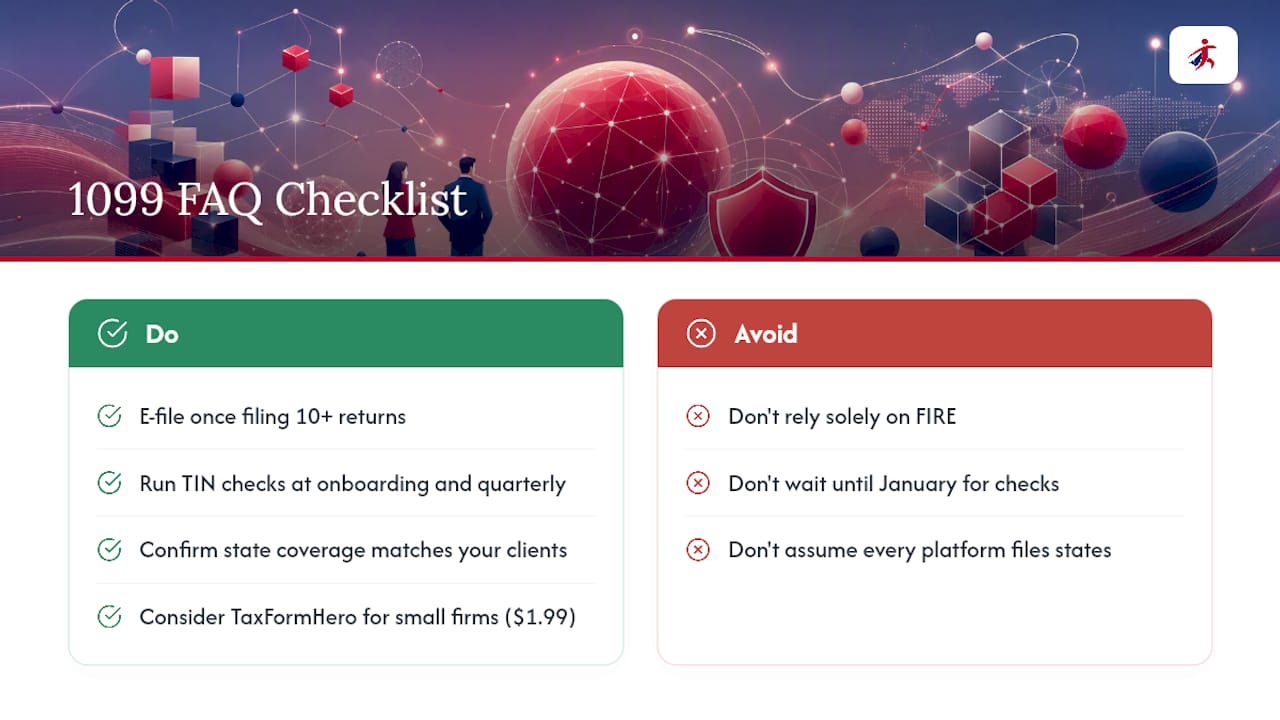
Do all 1099 platforms support state filing? No. Coverage varies significantly, ranging from a handful of states to 35 or more, so confirm coverage matches your specific client base before choosing a platform.
Sources
- Publication 1099 (2026), General Instructions for Certain Information Returns
- About Form 1099-NEC | Internal Revenue Service
- Instructions for Certain Information Returns (i1099gi) | Internal Revenue Service
Recommended

File Information Returns With Confidence
TaxFormHero supports 20+ IRS information returns, including 1099 and W-2 forms, with bulk Excel import, name/TIN matching and encrypted recipient delivery.
Explore TaxFormHero