The IRS Portal or TaxFormHero: how to choose

There are two routes for a 1099-MISC and they suit very different filers: the IRS IRIS Taxpayer Portal, which is free but expects manual entry, or an IRS-authorized e-filing platform like TaxFormHero, which charges per form. This guide compares them on setup time, volume limits and real cost. Choosing between them comes down to volume, workflow complexity, and whether you need services like TIN validation, state filing, or print-and-mail.
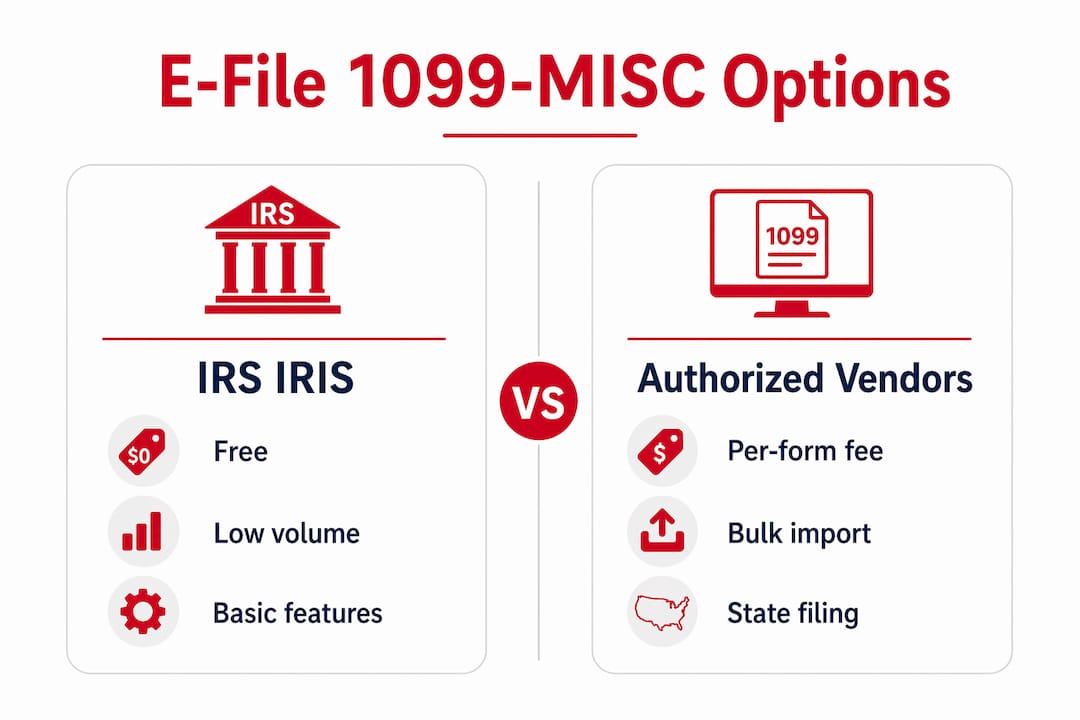
- IRS IRIS Taxpayer Portal: Best for low-volume filers who want no-cost electronic filing and can wait for TCC registration. Supports manual entry or CSV upload, corrections, and extension requests.
- TaxFormHero: Best for small businesses and tax professionals who need bulk imports, automated TIN matching, multi-state filing, or recipient e-delivery. Pricing is per form, with no subscription required.
- Recommendation: If you file for multiple contractors, need state filing, or want automated error checks, TaxFormHero is the more practical choice. One-off or very low-volume filers can use IRIS at no cost.
Before you file, check each payee's name and taxpayer ID against IRS records with TaxFormHero's TIN Matching: $0.49 per instant check, or $0.25 each in bulk, and a verified payee stays marked for three years, so a mismatch is caught before it becomes a penalty notice.
One critical threshold to know: the IRS requires e-filing when you have 10 or more combined information returns aggregated across all return types, effective for returns filed on or after January 1, 2024.
What are your filing options: IRS IRIS or TaxFormHero?
Both routes are IRS-compliant. The differences show up in cost, setup time, and the features available after you log in.
IRS IRIS Taxpayer Portal
- Free to use; no per-form fees
- Requires a Transmitter Control Code (TCC) and an EIN to register
- Supports manual data entry or CSV upload
- Allows corrections, extensions, and recipient copy downloads
- No state filing, print-and-mail, or TIN matching built in
- Best for infrequent filers with straightforward, low-volume submissions
TaxFormHero
- Charge per form filed; optional add-ons (state filing, print/mail, e-delivery) cost extra
- No TCC required; registration is typically faster
- Bulk import via CSV or Excel; real-time IRS rejection checks
- TIN validation against IRS/SSA records before submission
- State filing for multiple states, encrypted recipient e-delivery, and correction workflows
- Better fit for businesses filing across multiple contractors or states
| Feature | IRS IRIS Portal | TaxFormHero |
|---|---|---|
| Cost | Free | Per-form fee (e.g., from $1.99) |
| TCC required | Yes | No |
| Bulk import | CSV upload | CSV/Excel; mapped import |
| TIN verification | Not built in | Yes, automated |
| State filing | No | Yes, 41+ states |
| Print/mail & e-delivery | No | Yes (add-on) |
| Corrections workflow | Yes | Yes, with guided steps |
| Security/compliance | IRS-secured | SOC 2, 256-bit encryption |
| Customer support | IRS help resources | Vendor support channels |
Tax professionals often prefer TaxFormHero because it centralizes bulk imports, TIN validation, state filing, and print/mail services in one workflow, reducing the administrative time that comes with managing those tasks separately.

Need to get this filed? You can e-file Form 1099-MISC online with TaxFormHero, which is IRS-authorized and charges per form, not per month.
How do you prepare and e-file Form 1099-MISC step by step?
Getting the preparation right before you submit is where most errors are prevented. Work through this sequence before you touch the IRIS portal or TaxFormHero.
Preparation checklist
- Collect a completed W-9 from every contractor or payee before year-end. A missing or outdated W-9 means you are filing with unverified TIN data.
- Confirm which payments belong on 1099-MISC vs. 1099-NEC. Nonemployee compensation (box 1 of 1099-NEC) is the most common misfiling. Rents, royalties, prizes, medical payments, and certain fishing boat proceeds go on 1099-MISC. The IRS instructions spell out the box-by-box rules.
- Aggregate payment amounts per payee for the tax year. Verify that each total meets or exceeds the reportable threshold for the relevant box.
- Confirm your own payer EIN is correct. A transposed digit here causes an IRS rejection.
- Run TIN verification before you file. Mismatched TINs are one of the most common causes of IRS penalties.
Submission steps
- Choose your route: the IRIS portal or an IRS-authorized e-filing platform like TaxFormHero.
- If using IRIS: Apply for a TCC well in advance (processing can take up to 45 days per IRS guidance). Once approved, log in, enter data manually or upload your CSV using the IRIS template.
- If using TaxFormHero: Create an account, map your data to the TaxFormHero CSV or Excel template, and upload. No TCC needed.
- Run pre-submission validation. TaxFormHero flags TIN mismatches, missing fields, and box-placement errors before the file reaches the IRS.
- Submit the return. Save the IRS acknowledgement immediately. That acknowledgement is your proof of timely filing.
- Furnish recipient copies by the recipient deadline, either by print-and-mail or encrypted e-delivery.
Pro Tip: Start W-9 collection in October or November. Chasing TINs in January, when contractors are hard to reach, is the single biggest cause of late filings.
The FIRE system is no longer an option: it stops accepting returns on November 19, 2026 and IRIS is the only intake system after January 1, 2027, so the IRIS portal or an IRS-authorized e-filing platform like TaxFormHero is the path for every filer.

What deadlines and penalties apply to e-filing 1099-MISC?
The filing calendar has three distinct dates, and missing any one of them carries a separate penalty exposure.
- January 31: Deadline to furnish recipient copies of Form 1099-MISC (and 1099-NEC). This date does not move based on how you file.
- March 31: The generally cited electronic filing deadline for most 1099 series forms, including 1099-MISC. Always confirm the current year’s date in IRS Publication 1099, since dates can shift when they fall on a weekend or federal holiday.
- February 28: Deadline for paper filing, if you are still below the mandatory e-file threshold.
E-file threshold: The IRS reduced the mandatory e-file threshold to 10 or more aggregate information returns, effective for returns required to be filed on or after January 1, 2024. That count aggregates across all return types, including Forms W-2. If you file several 1099-MISCs and 1099-NECs, you may have crossed the threshold and must e-file.
Penalty overview: The IRS assesses tiered penalties for late filing, failure to furnish recipient copies, and incorrect or missing TINs. Penalty amounts increase the longer a return remains unfiled or uncorrected. Filing with an incorrect TIN, even unintentionally, can trigger a separate penalty per return. The most reliable mitigation is TIN validation before submission and keeping IRS acknowledgements as proof of timely filing.
Submitting at least a week before the deadline gives you time to address any IRS rejections without crossing into late-filing territory.
What does IRS IRIS do, and when should you use it?
The IRIS Taxpayer Portal is a no-cost, web-based system the IRS built specifically to help businesses move away from paper 1099 filings. It supports the full 1099-MISC filing cycle: data entry, CSV upload, corrections, and extension requests, all within a secure IRS-hosted environment.
What IRIS supports:
- Manual form entry or CSV file upload using the IRS-provided template
- Submission of corrections and automatic extension requests
- Recipient copy downloads directly from the portal
- No special software or Pub 1220-formatted files required for most filers
Access requirements:
- A valid EIN is required to apply
- A Transmitter Control Code (TCC) must be obtained before filing; the application process can take up to 45 days
- Filers who need to submit on short notice may find the TCC timeline a practical obstacle
When IRIS is the right choice:
IRIS works well for small businesses that file a handful of 1099s each year, have no state filing obligations, and do not need automated TIN matching or recipient e-delivery. If you currently mail paper 1099s to the IRS, IRIS is a direct, free upgrade.
Where IRIS falls short:
IRIS does not offer built-in TIN verification, state filing, print-and-mail services, or the kind of bulk import workflow that accounting firms and payroll departments need. For those use cases, TaxFormHero covers the gaps IRIS leaves open.
What TaxFormHero does that the IRIS portal does not
The IRIS portal stops at submission. These are the features that separate a platform that saves time from one that just moves the paperwork online.
Core compliance features:
- IRS authorization: TaxFormHero is an IRS-authorized transmitter, so you file under ours rather than waiting up to 45 days for a TCC of your own.
- TIN validation: Automated matching against IRS/SSA records before submission catches errors that would otherwise become penalties.
- Real-time rejection checks: The platform should flag formatting errors, missing fields, and TIN mismatches before the file leaves your account.
- Bulk import: CSV or Excel import with field mapping is necessary for anyone filing more than a few dozen returns.
- Transparent per-form pricing: No monthly fees or subscriptions. You should know the exact cost before you submit.
Add-ons worth evaluating:
- State filing support (direct filing to 41+ states saves a separate workflow)
- Print-and-mail services for recipient copies
- Encrypted e-delivery with a recipient portal
- API or accounting software integrations for payroll and HR teams
- Multi-user account access for accounting firms
Security and trust signals:
- SOC 2 certification
- 256-bit data encryption
- Documented data retention and privacy practices
Pro Tip: A correction belongs in the same account as the original. TaxFormHero keeps them together. Platforms that require you to start a new filing for a correction add unnecessary steps and increase the risk of a second error.
Support:
TaxFormHero provides support through filing season, clear guidance on correction and retransmit workflows, and documented steps for resolving common IRS rejection codes.
TaxFormHero: IRS-authorized filing for small businesses
TaxFormHero is an IRS-authorized transmitter built for small businesses, accounting firms, and tax professionals who need a pay-per-form filing workflow without a subscription commitment. It covers 1099-MISC alongside 20+ other IRS form types, including W-2 and ACA forms.
Key features at a glance:
- IRS-authorized transmitter status
- SOC 2 security posture with 256-bit encrypted data storage
- Automated TIN verification against IRS/SSA records
- Bulk import via CSV or Excel with guided field mapping
- Direct state filing for 41+ states
- Print-and-mail and encrypted recipient e-delivery as add-ons
- No signup fees, no subscriptions; pay only for what you file
Pricing snapshot:
| Service | Fee |
|---|---|
| E-file per form (federal) | From $1.99 |
| State filing (per form) | Add-on fee |
| Print and mail (per recipient) | Add-on fee |
| Encrypted e-delivery | Add-on fee |
| TIN verification | Available as add-on |
TaxFormHero’s pay-per-form model suits firms that value per-transaction cost transparency. There is no annual commitment, which makes it practical for seasonal accounting staff and small businesses that file once a year. The combination of TIN validation, real-time rejection checks, and state filing in one platform addresses the gaps that IRIS leaves open for anyone with multi-state obligations or bulk filing needs.
What mistakes do filers make when e-filing 1099-MISC, and how do you fix them?
Most rejections and penalties trace back to a small set of recurring errors. Knowing them in advance is the most direct way to avoid them.
Common errors:
- 1099-MISC vs. 1099-NEC confusion: Nonemployee compensation must go on 1099-NEC, not 1099-MISC. The IRS instructions are explicit, but this remains one of the most frequent misfiling errors.
- Incorrect or missing TINs: A TIN that does not match IRS records triggers a penalty per return. Run TIN verification before submission, not after.
- Swapped recipient names and EINs: Entering a business EIN under an individual’s name (or vice versa) causes an IRS mismatch rejection.
- Wrong box placement: Boxes 8 and 10 on 1099-MISC have specific rules. Placing an amount in the wrong box does not cause a rejection but does create a reporting error that may require a corrected return.
- CSV mapping errors: During bulk import, misaligned column headers are a common source of rejected or incomplete submissions.
How to correct a filed return:
- Identify the error type: TIN mismatch, wrong amount, wrong box, or wrong form type.
- Prepare a corrected Form 1099-MISC. Check the “CORRECTED” box at the top of the form.
- Submit the corrected return through the same portal or service used for the original.
- Furnish a corrected copy to the recipient promptly.
- Retain the IRS acknowledgement for the corrected submission.
For CSV mapping errors caught before IRS acceptance, correct the source file and retransmit. For returns already accepted, the corrected-return workflow above applies.
Verifying IRS acceptance:
After submission, the IRS issues an acknowledgement with a status code. An “Accepted” status confirms the return was received and processed. A “Rejected” status includes an error code; resolve the flagged issue and retransmit. Keep all acknowledgement records on file.
Key Takeaways
E-filing Form 1099-MISC requires choosing between the free IRS IRIS portal and an IRS-authorized e-filing platform like TaxFormHero, with the right choice depending on your filing volume, state obligations, and need for TIN validation.
| Point | Details |
|---|---|
| Two valid e-file routes | Use IRS IRIS for free, low-volume filing; use TaxFormHero for bulk, multi-state, or add-on needs. |
| Mandatory e-file threshold | E-filing is required at 10 or more combined information returns, aggregated across all return types, effective January 1, 2024. |
| Recipient deadline is fixed | Furnish recipient copies by January 31 regardless of how you file; the IRS e-file deadline is generally March 31. |
| TIN validation prevents penalties | Run TIN verification before submission to avoid per-return penalties for incorrect or missing TINs. |
| TaxFormHero option | TaxFormHero offers IRS-authorized, pay-per-form e-filing from $1.99 with TIN verification, state filing for 41+ states, and SOC 2 security. |
Why IRS-authorized e-filing matters more than most filers realize
The gap between filing compliantly and filing correctly is wider than it looks from the outside. Many small businesses treat the 1099 process as a January checkbox, rushing through TIN collection and form selection in the final days before the recipient deadline. That approach works until it doesn’t, and when it fails, the cost is not just a penalty notice. It is the rework, the corrected returns, the recipient confusion, and the audit exposure that follow.
What practitioners who handle volume filings understand is that the operational value of a service like TaxFormHero is not primarily about convenience. It is about risk containment. Automated TIN validation catches mismatches before they become penalty-per-return events. Real-time rejection checks mean errors surface in your account, not in an IRS notice weeks later. Consolidated state and federal filing eliminates the parallel workflow that paper or portal-only filers manage manually.
The common objection is cost: why pay per form when IRIS is free? The honest answer is that IRIS is the right tool for a narrow use case, specifically the filer with a small, stable contractor list, no state filing obligations, and enough lead time to obtain a TCC. Outside that profile, the per-form cost of TaxFormHero is offset quickly by the time and error-correction costs it prevents. Matching your filing method to your actual volume and complexity, rather than defaulting to the lowest-cost option, is the decision that holds up at year-end.
Where to file once you have chosen your route
Per-form e-filing without a subscription is exactly what TaxFormHero delivers. For small businesses and tax professionals who need IRS-authorized filing, TIN verification, and state filing for 41+ states in one place, TaxFormHero removes the friction of managing those tasks separately.
Pricing starts at $1.99 per form, with add-ons for state filing, print-and-mail, and encrypted recipient e-delivery available at checkout. No annual commitment, no signup fee. The platform is backed by SOC 2 certification and 256-bit encrypted data storage, so sensitive payee information stays protected from upload through delivery.
Ready to file? Start your 1099-MISC filing at TaxFormHero, upload your spreadsheet, and submit in minutes.
This article is general information, not professional tax or legal advice. Confirm current IRS rules, deadlines, and thresholds with IRS publications or a qualified tax professional for your specific situation.
Official resources and further reading
The sources below are the authoritative references for 1099-MISC filing rules, deadlines, and electronic filing specifications.
| Resource | What it covers |
|---|---|
| IRS IRIS Taxpayer Portal | Free web-based e-filing for 1099 series; CSV templates, portal user guide, corrections, and extension requests |
| IRS Publication 1099 | General instructions for information returns: due dates, e-file availability, TCC requirements, and the Guide to Information Returns |
| Instructions for Forms 1099-MISC and 1099-NEC | Box-by-box filing rules, form selection guidance, and penalty information |
| IRS e-file information returns | Full list of forms supported for electronic filing by tax year |
| IRS General Instructions (Pub 1220 reference) | FIRE system requirements, Pub 1220 electronic file format specifications for bulk filers |
- Bookmark the IRS filing calendar each year; electronic due dates shift when they fall on weekends or federal holidays.
- If you plan to use the FIRE system for Pub 1220-formatted bulk files, review the technical specifications well before filing season. The formatting requirements are detailed and errors in the file structure cause full-batch rejections.
- Publication 1099 is updated annually. Download the current version at the start of each filing season to confirm threshold amounts, due dates, and any rule changes.
Recommended
FAQ
Do I need Form 1096 if I e-file Form 1099-MISC?
No. Form 1096 is a paper transmittal cover sheet, and the IRS does not require it for returns filed electronically through IRIS or an IRS-authorized e-filing platform like TaxFormHero. It only applies when you mail paper information returns.
What is the deadline to furnish recipient copies of 1099-MISC?
January 31, regardless of whether you file electronically or on paper. This date does not move based on your filing method.
Which payments go on 1099-MISC instead of 1099-NEC?
Rents, royalties, prizes, medical payments, and certain fishing boat proceeds are reported on 1099-MISC. Nonemployee compensation goes on 1099-NEC instead.

File Information Returns With Confidence
TaxFormHero supports 20+ IRS information returns, including 1099 and W-2 forms, with bulk Excel import, name/TIN matching and encrypted recipient delivery.
Explore TaxFormHero