
The best practical path for 1099 e-filing is a platform that is IRS-authorized, SOC 2 ready, and built around TIN matching and correction workflows, not a bare-bones form generator. TaxFormHero fits that profile as a pay-per-form option, and choosing this kind of platform matters because it cuts compliance risk and shaves hours off year-end filing while reducing the rejections that come from bad TINs or missed corrections.
TL;DR:
- Choosing IRS-authorized and SOC 2 ready e-filing platforms reduces compliance risks and minimizes rejection rates caused by TIN mismatches or missed corrections.
- Successful vendors provide transparent pricing, clear rejection handling, and support for corrections, state filing, and encrypted recipient delivery options.
- Running a live trial and uploading small sample data files reveals how well the platform manages errors, TIN mismatches, and correction workflows in practice.
- E-filing becomes mandatory for businesses submitting 10 or more information returns annually, making bulk import and TIN matching crucial for cost-effectiveness.
- Applying for a Transmitter Control Code early and testing file submissions ahead of deadlines prevent delays and help manage growing filing volumes efficiently.
What to Look for in 1099 E-Filing Software
Picking 1099 e-filing software is a compliance decision disguised as a shopping decision. The wrong choice does not just waste money, it creates rejected filings, penalty notices, and a scramble in late January when you least have time for it.
Start with IRS authorization. The IRS now requires electronic filing once a business submits 10 or more information returns in a calendar year, counted across all form types, including W-2s, 1099s, and ACA forms combined. That threshold catches far more small businesses than people expect. Confirm the software actually transmits through the IRS systems it claims to, whether that is the IRIS platform, the older FIRE system, or an Application-to-Application (A2A) connection, and ask whether the vendor helps you obtain a Transmitter Control Code (TCC) if you do not already have one.
TIN matching is the next filter. Software that validates payee names against Social Security Administration and IRS records before submission catches mismatches that would otherwise trigger a rejection weeks later.
Bulk import quality separates good software from tedious software. A clean CSV mapping tool that flags errors during upload, rather than after submission, saves hours compared to manual re-entry, and pairing that with a bookkeeping integration removes a layer of cleanup entirely.
Correction handling deserves close attention. Under Publication 1220, corrected returns must be e-filed if the original was e-filed, so software that manages both in one interface prevents mismatched paper and electronic submissions later.
Other checkpoints worth confirming before you commit:
- Federal filing plus state filing support, including Combined Federal/State Filing (CF/SF) participation where applicable.
- Recipient delivery options: encrypted e-delivery, print and mail, and stored consent records.
- Security signals: SOC 2 readiness, encryption at rest and in transit, and access controls.
- Transparent per-form pricing instead of bundled subscriptions that penalize low-volume filers.
- Responsive support with clear rejection and error messaging, not a generic “resubmit” prompt.
Pro Tip: Ask a vendor directly how they handle a rejected TIN match. If the answer is vague, that’s a preview of how support will handle a real problem in April.
What to Verify During a Trial or Demo
A trial run tells you more than a features page ever will. Before signing up with any 1099 e-filing platform, work through this checklist:
- Confirm IRS authorization and ask exactly how the vendor transmits returns, whether that’s IRIS, A2A, or FIRE, and whether they assist with TCC applications.
- Request a live demo of TIN matching so you can see how mismatches are flagged before submission, not after.
- Upload a small sample CSV and pay attention to the error messages. Vague warnings mean more manual troubleshooting later.
- Ask how corrections are filed and whether the platform keeps a visible history tying each corrected return to its original.
- Verify state filing coverage for the states where your recipients live, and confirm CF/SF participation if you rely on it.
- Check how recipient e-delivery consent is captured and stored, since the IRS holds filers responsible for proper consent records.
- Request security documentation, ideally a SOC 2 readiness summary and specifics on encryption standards.
- Get every pricing line item in writing: base form fee, state filing fee, TIN matching fee, and print and mail costs if you need them.
Vendors who answer these questions clearly and quickly are usually the ones whose support will hold up when a filing gets rejected in real time.
How Filing Volume Should Drive Your Choice
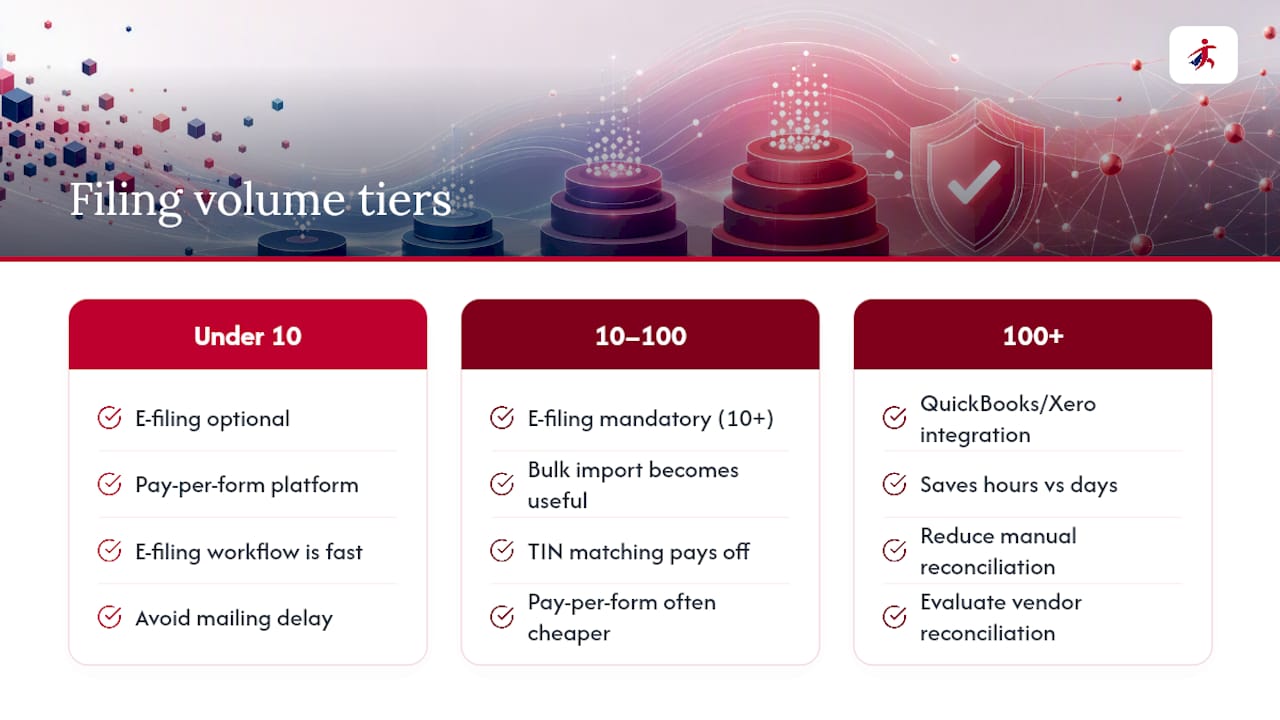
Filing volume, not company size, should drive the decision. A five-person landscaping business filing eight 1099-NECs has different needs than a bookkeeping firm processing 400 forms across a dozen clients.
Under 10 returns: You are technically still allowed to paper file, but most owners find the e-filing workflow just as fast, and it avoids the mailing delay entirely. A simple pay-per-form platform works fine here.
10 to 100 returns: This is where e-filing becomes mandatory, since the IRS threshold sits at 10 information returns aggregated across form types. Bulk import and TIN matching start paying for themselves at this volume, and a pay-per-form model usually beats a flat subscription on cost.
100+ returns: Native integration with QuickBooks or Xero stops being a nice-to-have and starts being the difference between a two-hour filing session and a two-day one. At this volume, evaluate vendors partly on how well they eliminate manual reconciliation between your books and your filed totals.
If you’re staffing this internally without dedicated tax expertise, weigh outsourcing the correction and state filing pieces even if you keep the initial filing in-house. A comparison of small business tax software options is worth a look if you’re still weighing DIY tools against outsourced processing.
Whatever platform you choose, apply for your TCC early. Publication 1220 recommends submitting test files well ahead of deadlines, and TCC processing itself is not instant.
Roughly 10 information returns is the line where the IRS moves you from optional e-filing to a firm requirement. Businesses that stay just under that number by accident often trip it the very next tax year as they grow.
TaxFormHero: What the Compliance Proofs Actually Show
TaxFormHero is built around the two credentials that matter most for this decision: IRS authorization and SOC 2 readiness are important baseline credentials a filer should demand from any e-filing vendor before trusting it with sensitive payee data.
Beyond that baseline, the platform’s feature set covers the checklist points above directly:
- Bulk import with CSV mapping for filers moving from spreadsheets or another system.
- Built-in TIN matching and verification to catch mismatches before submission.
- State filing support and CF/SF handling for multi-state recipients.
- Encrypted e-delivery and print and mail add-ons for recipient copies.
- 256-bit data encryption covering data at rest and in transit.
Pricing runs pay-per-form, starting at a low price and dropping further at higher volumes, with no signup fees or subscriptions. That structure suits freelancers filing a handful of 1099s just as well as payroll teams, CPAs, and accounting firms filing in bulk. Full pricing tiers are published rather than quoted case by case, which matters when you’re comparing costs across vendors before committing.
Why the Checklist Matters More Than the Feature List
Most buying guides for 1099 software read like feature comparisons: bulk import, check; state filing, check. That misses the point. The IRS rules, not the feature list, should set the order of your evaluation.
The 10-return threshold is where most small businesses get caught off guard, often because they grew from 8 filings to 14 without noticing they had crossed into mandatory e-filing territory. The correction rule is the second blind spot. Filers assume a mistake can be quietly fixed on paper, but Publication 1220 is explicit that a corrected return follows the same filing method as the original.
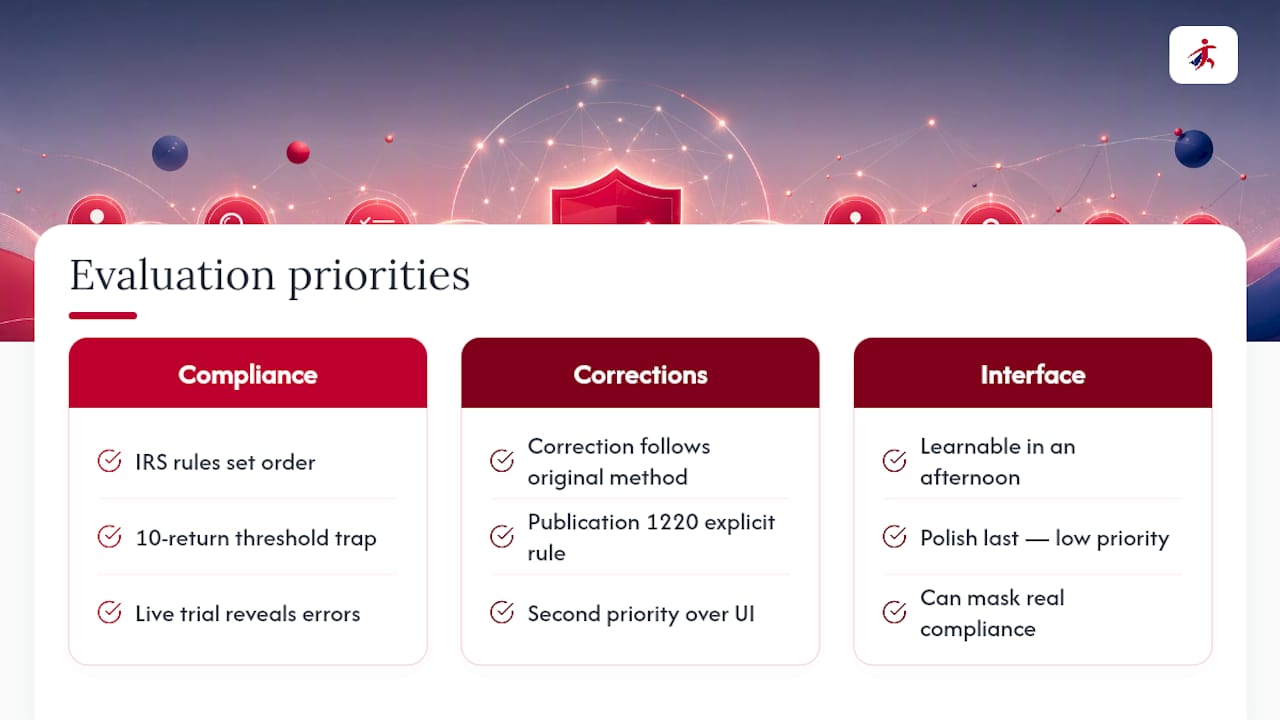
What gets underrated is the value of a live trial. Reading a features page tells you what a vendor claims. Uploading a real CSV and watching how errors surface tells you what a vendor actually does. Any platform can advertise TIN matching, but only a demo shows you whether the error messages are useful or just noise.
Prioritize the vendor’s compliance posture first, its correction workflow second, and its interface polish last. Interfaces can be learned in an afternoon. A rejected filing costs you weeks.
— Nazrul
Get Started: File Your First 1099 With TaxFormHero
Filing your first batch through TaxFormHero takes less setup than most people expect. Start by pulling together your W-9s, payment totals, recipient EINs or SSNs, and any recipient email addresses you’ll need for e-delivery consent.

Once your data is together, import a small sample first rather than your full recipient list. Run TIN matching on that batch, review any flagged mismatches, and submit a test file if you’re filing at volume for the first time. This catches formatting issues before they touch your entire filing run. If you don’t already have a Transmitter Control Code, apply early, since TCC processing takes time and the IRS recommends starting well before your filing deadline.
TaxFormHero charges per form, starting at $1.99 and dropping to $0.45 at higher volumes, with no subscription or signup fee attached. Review the full pricing breakdown to see exactly what a state filing, print and mail, or e-delivery add-on costs before you file, then head to the TaxFormHero platform to create your account and start your first import.
Recommended
- Fixing a 1099 E-File Rejection: What to Do Right Now
- The 1099 Compliance Checklist Every Business Needs
- The Best 1099 Software for Accountants in 2026
- How to File 1099 Forms: A 2026 Small Business Guide

File Information Returns With Confidence
TaxFormHero supports 20+ IRS information returns, including 1099 and W-2 forms, with bulk Excel import, name/TIN matching and encrypted recipient delivery.
Explore TaxFormHero