
Filing a 1099 electronically typically costs a few dollars per form through paid services, or nothing at all if you use the IRS’s free IRIS portal. The real decision isn’t about finding the cheapest option. It’s choosing between free-but-manual filing and a paid platform like TaxFormHero that saves time through automation, bulk import, and add-ons such as state filing and TIN matching.
TL;DR:
- Using the IRS’s free IRIS portal suits small businesses comfortable with manual data entry and handling only a few forms annually.
- Paid platforms reduce time by offering automation, bulk import, and comprehensive add-ons like state filing and TIN matching, especially beneficial at higher volumes.
- Per-form e-file costs generally range from $1.99 to a few dollars, decreasing with volume, but correction or additional service fees can increase the total.
- Including state filing, TIN verification, and delivery options raises overall costs, making early preparation of W-9s and pre-validation key to saving money.
- For businesses with clean records and consistent yearly filing, a pay-per-form service like TaxFormHero offers predictable costs without monthly commitments.
How Much Does It Cost to E-File a 1099?
Three pricing models cover almost every filer: the IRS’s free portal, pay-per-form platforms, and bundled accounting software.
The IRS IRIS Taxpayer Portal lets you file Form 1099 series returns at no cost, either by entering data manually or uploading a CSV file. IRIS works well if you’re filing a small batch and don’t mind handling data entry yourself. It issues confirmations and error alerts, so you know a return went through clean, but it offers none of the extras that paid platforms build in, like automatic state filing or recipient e-delivery.
Pay-per-form platforms charge only when you file, with no subscription or account fee. Some pay-per-form platforms follow this model, and pricing often decreases with higher volume based on typical industry practices.
Bundled or subscription software, often part of a broader payroll or accounting suite, folds 1099 filing into a package you’re already paying for. This route tends to make sense only if you’re already using that platform for payroll, invoicing, or bookkeeping. Standalone, it’s rarely the cheapest way to file a handful of contractor forms.
Here’s how the three stack up on flexibility:
- IRIS: Free, IRS-run, best for low-volume filers comfortable with manual entry or CSV uploads.
- Pay-per-form platforms: No subscription, per-form pricing that may decrease at higher volumes, built-in add-ons.
- Bundled software: Convenient if already subscribed for payroll or bookkeeping, but usually less cost-effective as a standalone 1099 solution.
If you would rather not do this on paper, e-file Form 1099-NEC online with TaxFormHero instead.
What Do Per-Form 1099 Filing Fees Actually Look Like?
Per-form pricing scales with volume, and the gap between a 5-form filer and a 200-form filer can be significant.
For businesses filing 1 to 10 forms, expect per-form rates on the higher end of the typical range, since volume discounts haven’t kicked in yet. Filers in the 11 to 100 range usually see per-form costs drop as platforms apply tiered pricing. Once you cross 100 forms, most services offer their lowest per-unit rate, sometimes down near the bottom of the market.
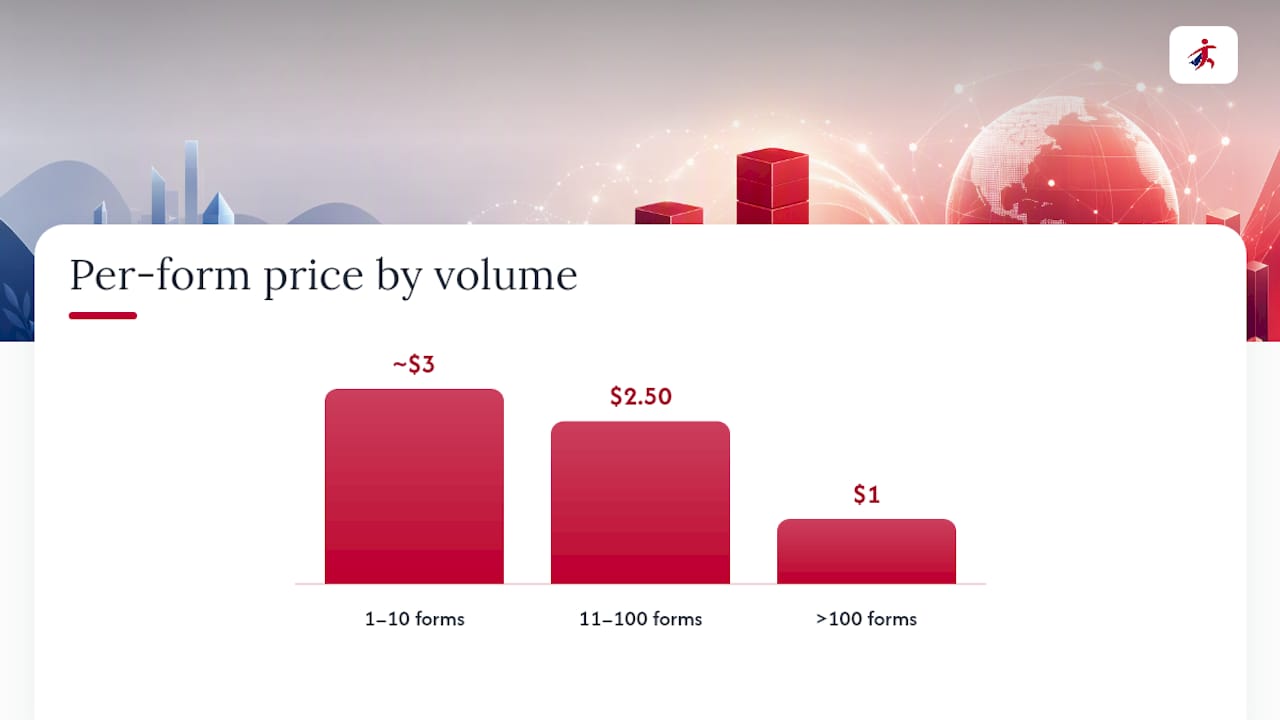
Industry pricing summaries confirm that paid e-file services commonly charge a few dollars per form, with volume discounts built into most fee schedules. That’s the baseline. What changes the final number is form type and whether you need corrections.
Quick math: A business filing 12 forms at $2.50 each spends $30 before any add-ons. A business filing 150 forms might pay closer to $1 each, or around $150 total, because of volume pricing.
A few things that shift the price beyond the base rate:
- Correction filings often carry their own fee, separate from the original submission.
- Less common form types (1099-DA, for instance) sometimes price differently than high-volume forms like 1099-NEC or 1099-MISC.
- TIN matching, run per recipient, is a near-universal add-on that raises your per-form total slightly but reduces the risk of IRS mismatch notices.
Note that once your business must file 10 or more information returns in a year, the IRS requires electronic filing, which pushes many small filers who’d otherwise mail paper forms into evaluating e-file pricing for the first time.
What Add-Ons Change Your Total 1099 Filing Cost?
The base per-form rate is rarely your final bill. Add-ons are where costs quietly climb, and knowing which ones you actually need keeps your budget accurate.
- State filing. Many states require a separate filing beyond the federal 1099, and platforms typically charge a per-form state fee on top of the federal rate. Skipping this when your state requires it risks a compliance gap, not just a missed discount.
- TIN matching. This validates a recipient’s taxpayer ID against IRS records before you file, and it’s commonly sold as a per-unit add-on. It costs a little extra per recipient but heads off costly B-notices later.
- Recipient delivery. Encrypted e-delivery is usually the cheaper option; printed and mailed copies cost more per recipient because of postage and handling.
- Corrections. Filing an amended 1099 after the fact almost always carries its own fee, separate from the original submission cost.
Pro Tip: Run TIN matching before you file, not after. Catching a bad TIN pre-submission costs a small add-on fee. Catching it after the IRS flags a mismatch costs you a correction filing plus the administrative time to track down the recipient again.
Should You Hire an Accountant or Use an Automated Service?
The right choice depends less on your form count and more on the state of your books.
An accountant’s higher fee earns its keep when your records are incomplete, when you need tax advice alongside the filing, or when corrections require judgment calls a software platform can’t make. Small tax firms often bill for reconciling messy books as a separate cost from the actual 1099 preparation, which can double your total spend before a single form gets filed.
Automated per-form services are the more cost-effective route when your records are already clean, when you’re filing the same forms year after year, and when you want integrations that pull vendor data automatically instead of retyping it.
- Messy books, need for tax advice, or complicated corrections: accountant.
- Clean records, repeat annual volume, integration needs: automated platform.
- Somewhere in between: run the numbers using the calculator method below before deciding.
How Do You Calculate Your Total 1099 E-File Cost?
Estimating your bill takes one formula and about two minutes.
- Multiply your form count by the per-form rate: forms × per-form rate.
- Add any state filing fees, since these are often charged per form, per state.
- Add TIN-match units if you’re validating recipient information, usually priced per recipient.
- Add mailing or correction costs if you need paper delivery or expect to amend any forms.
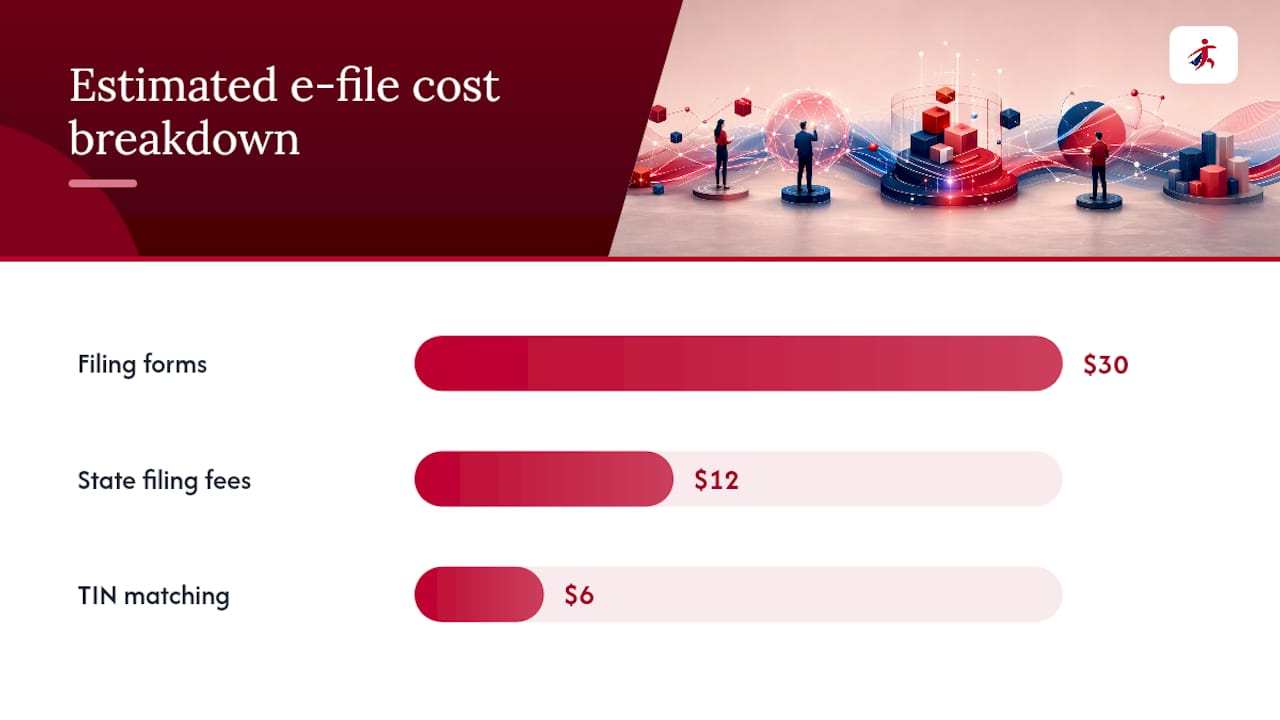
Worked example: Say you’re filing 12 contractor 1099-NEC forms, all in one state, with a TIN match on each. At $2.50 per form, that’s $30. One state filing at roughly $1 per form adds $12. TIN matching at $0.50 per recipient adds another $6. Total estimated cost: $48, before any corrections.
Two habits shrink that number before you even open a filing platform: collect W-9s from every contractor early in the year instead of chasing them in January, and pre-validate TINs so you’re not paying for corrections down the line.
TaxFormHero’s Pricing Model: What’s Included
TaxFormHero runs on a pay-per-form structure with pricing that starts as low as $1.99 per form and drops further at higher volumes, with no subscription or signup fee attached.
That transparency matters because the biggest source of billing surprise in this industry is the add-on you didn’t know you needed until checkout. The service typically lists per-form rates upfront and prices add-ons separately, so what you see going in is close to what you pay going out.
What’s included beyond the base filing:
- IRS authorization and data security compliance.
- Bulk import capabilities for large batches of forms.
- State filing services in many states, avoiding separate manual submissions.
- TIN verification and encrypted e-delivery or print-and-mail options.
- Support for numerous IRS forms including 1099 and W-2 series.
For a filer who wants predictable per-form pricing without a monthly commitment, this structure removes most of the guesswork that comes with tiered vendor pricing pages.
Keeping Your 1099 Costs Down: A Quick Checklist
The businesses that pay the least per filing season aren’t the ones chasing the cheapest advertised rate. They’re the ones who prep early.
Collect W-9s from every vendor before December, not during it. Run TIN checks before submission, since a rejected form or a mismatch notice costs more to fix than to prevent. Decide between IRIS and a paid platform based on your actual volume and whether you need integrations, not on which sounds cheaper in the abstract. And track your filing deadlines closely, since late filings and after-the-fact corrections both carry fees that a little planning avoids entirely.
— Nazrul
Where to Check Exact 1099 E-File Pricing
TaxFormHero’s pricing and filing platform shows exact per-form rates before you commit to anything, with no subscription and no signup fee attached. You pay for the forms you file, plus whichever add-ons your situation actually requires, whether that’s state filing, TIN matching, or print-and-mail delivery.

If you’re filing 1099-NEC, W-2, ACA, or any of the other 20-plus IRS forms TaxFormHero supports, the step-by-step filing guide walks through the process and gives you a clear cost estimate before you upload a single form. It’s a reasonable next stop whether you’re filing five forms or five hundred, particularly if your books are already clean and you’d rather skip the accountant markup covered earlier. Run your numbers there, compare against the calculator method above, and file once the total makes sense for your budget.
Sources
- File Form 1099 series information returns for free online | Internal Revenue Service
- How to File 1099 Forms Online (2026): Complete Guide | Quarterly1099
- Pricing – The Tax Team LLC
FAQ
How much do you have to pay to file a 1099?
Paid e-file platforms typically charge a few dollars per form depending on volume, while the IRS IRIS portal is free for anyone willing to enter data manually or upload a CSV.
Can you e-file a 1099 for free?
Yes. The IRS’s IRIS Taxpayer Portal lets you file Form 1099 series returns at no cost, with manual entry or CSV upload, plus confirmations and error alerts.
How much does an accountant charge to file a 1099?
Accountant fees vary widely and often exceed per-form software pricing, especially when messy bookkeeping requires separate reconciliation work billed on top of the actual filing.
Is e-filing 1099 forms still free through the IRS?
Yes, IRIS remains free for filers who handle their own data entry, though it lacks the bulk import, state filing automation, and add-ons that paid platforms like TaxFormHero include.
Is e-filing a 1099 worth it compared to paper filing?
For any business filing 10 or more returns, e-filing is mandatory under current IRS rules, and even below that threshold it’s typically faster and less error-prone than paper submission.
Recommended
- Cheaper 1099-NEC Filing Online: From $1.99 per Form for Small Business
- How to File 1099 Forms: A 2026 Small Business Guide
- Avoid 1099 Rejections: 8 Compliance Checks for U.S. E Filing Software
- Best Small Business 1099 Software: What to Use in 2026

File Information Returns With Confidence
TaxFormHero supports 20+ IRS information returns, including 1099 and W-2 forms, with bulk Excel import, name/TIN matching and encrypted recipient delivery.
Explore TaxFormHero